> For the complete documentation index, see [llms.txt](https://docs.goaffpro.com/llms.txt). Markdown versions of documentation pages are available by appending `.md` to page URLs; this page is available as [Markdown](https://docs.goaffpro.com/affiliate-payments/view-pending-payouts.md).
# View Pending Payouts
**GoAffPro** provides you with the option to view the pending payments of affiliates.
To view the pending payments, go to the **Payments** section in the **Payouts** tab of the GoAffPro admin panel.
Payouts > Payments
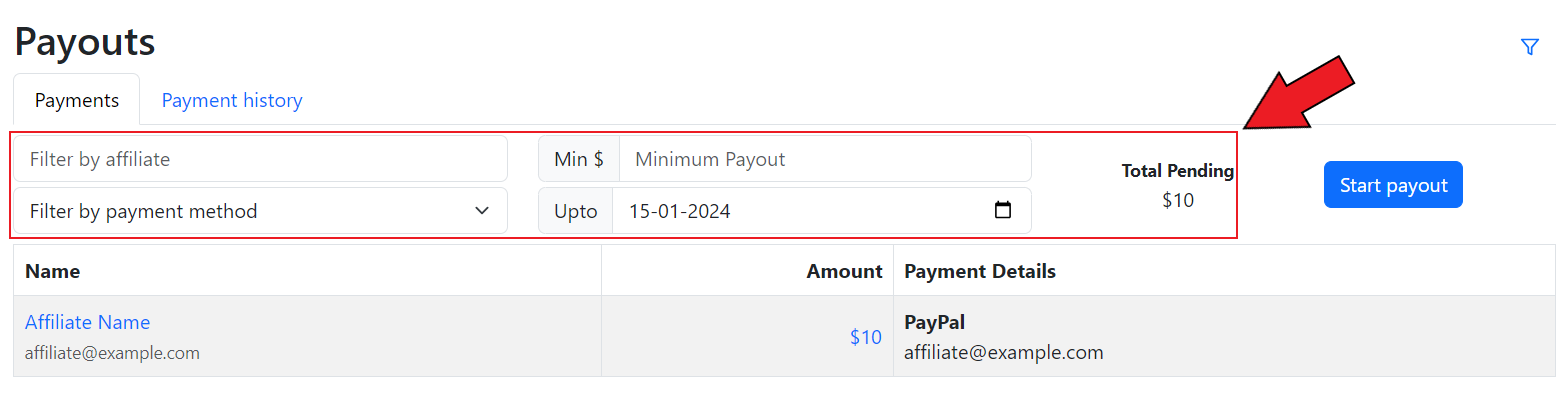
Here, you can filter the pending payments by the affiliate's name, payment method, minimum payout amount, and the "upto" date. You can also view the total pending amount that is to be paid.
Filter the payments
The pending payments table will display the name of the affiliate, the pending payment amount, and their payment details.
Pending payment table
You can also click on **Start Payout** to create a payout session and [mark the payment as paid](/affiliate-payments/create-payout-session.md).