# Changelog

### January 2026

#### Default Sponsor

Set a [default sponsor](https://docs.goaffpro.com/multi-level-affiliate-network/enable-multi-level-marketing/set-default-sponsor) for the program so that any new affiliate who is not sponsored will automatically be placed under this affiliate as a downline.

You can set this from the Multi Level > Default Sponsor section.

<figure><img src="https://1200686697-files.gitbook.io/~/files/v0/b/gitbook-x-prod.appspot.com/o/spaces%2F-LdPzLtyP46oY7cyXnkw%2Fuploads%2FClMBm8LNWLAH2ZftHfCQ%2Fimage.png?alt=media&#x26;token=b02749ea-3634-4d85-a987-e3b09dae2e0e" alt=""><figcaption><p>Multi Level > Default Sponsor</p></figcaption></figure>

***

### December 2025

#### Target Bonus&#x20;

The [target bonus](https://docs.goaffpro.com/affiliate-rewards/set-target-for-affiliates) option now allows you to set the bonus as store credit for the affiliate upon completing the target objective.

You can set this from the Targets > Settings > Target Bonus section.&#x20;

<figure><img src="https://1200686697-files.gitbook.io/~/files/v0/b/gitbook-x-prod.appspot.com/o/spaces%2F-LdPzLtyP46oY7cyXnkw%2Fuploads%2FfOssvryD4r9tv8JOs9Xc%2FScreenshot%202026-01-22%2000064042.png?alt=media&#x26;token=9d43e25c-18ef-4b03-9f5b-1fea4a5ee679" alt=""><figcaption><p>Targets > Settings > Target Bonus > Add a bonus</p></figcaption></figure>

***

### November 2025

#### Earnings Report

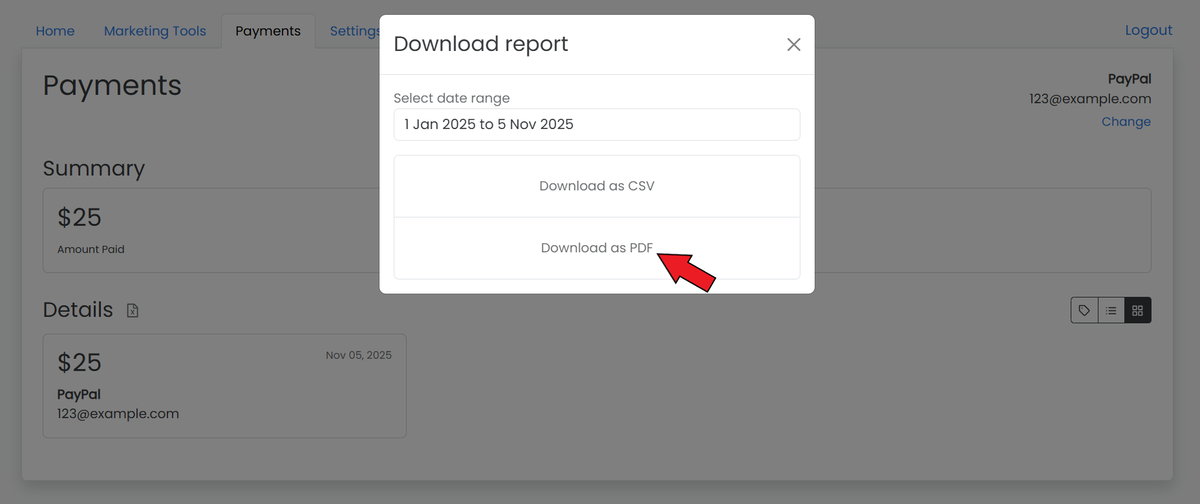
Enable affiliates to download a [payout earnings report](https://docs.goaffpro.com/program-settings/extra-settings/earnings-report-for-affiliates) from their dashboard in a PDF format. It also lets you customize the earnings report template.&#x20;

You can enable the Earnings Report option from the Settings > Extras section.&#x20;

<figure><img src="https://1200686697-files.gitbook.io/~/files/v0/b/gitbook-x-prod.appspot.com/o/spaces%2F-LdPzLtyP46oY7cyXnkw%2Fuploads%2FGVdVuCI4qoKanyDmJcq6%2Fimage.png?alt=media&#x26;token=dda0359e-69fe-4297-b624-6b1fecf80978" alt=""><figcaption><p>Settings > Extras > Earnings Reports</p></figcaption></figure>

After enabling, affiliates can download their payout earnings report from the Payments section in their dashboard.&#x20;

<figure><img src="https://1200686697-files.gitbook.io/~/files/v0/b/gitbook-x-prod.appspot.com/o/spaces%2F-LdPzLtyP46oY7cyXnkw%2Fuploads%2FdURPJS6L8uVWXm1bsW47%2Fimage.png?alt=media&#x26;token=a51b7c3f-2696-41e4-9677-0f6aae471b03" alt=""><figcaption><p>Affiliate Dashboard > Payments</p></figcaption></figure>

#### Affiliate's Notification Preferences

The option to disable all email notifications for an affiliate has been added to the affiliate's notification preferences.

You can set this from the Affiliates > All Affiliates > Click on the affiliate's name to open their profile page > Settings > Notification Preferences section.&#x20;

<figure><img src="https://1200686697-files.gitbook.io/~/files/v0/b/gitbook-x-prod.appspot.com/o/spaces%2F-LdPzLtyP46oY7cyXnkw%2Fuploads%2FraStQLDupV0h8el1Uqsu%2FScreenshot%202025-12-25%200139463.png?alt=media&#x26;token=b7cc6049-ad27-4699-8bbe-cae3edb37ca1" alt=""><figcaption><p>Affiliates > All Affiliates > Click on the affiliate's name > Settings > Notification Preferences section</p></figcaption></figure>

***

### October 2025

#### AI Tools

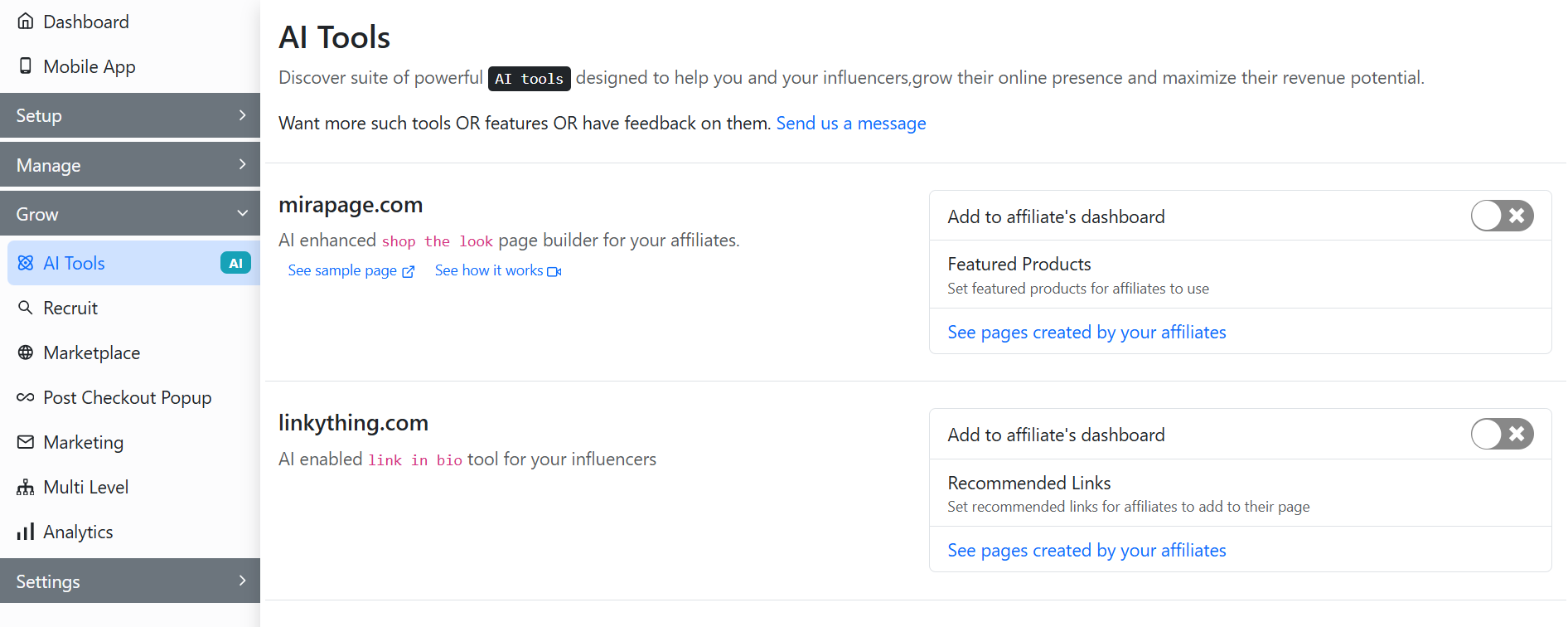
AI tools have been added to help affiliates and influencers enhance their online presence and optimize revenue potential.

* [Linkything](https://docs.goaffpro.com/affiliate-portal-customization/advanced-customization/enable-linkything-for-affiliates) is a tool for creating a link-in-bio landing page that hosts multiple links, allowing users to place a single URL in their social media profile bios.
* [Mirapage](https://docs.goaffpro.com/affiliate-portal-customization/advanced-customization/enable-mirapage-for-affiliates) is an AI-enhanced shop-the-look page builder for affiliates, enabling them to add curated products to their page.

You can enable them from the AI Tools tab for your affiliates.&#x20;

<figure><img src="https://1200686697-files.gitbook.io/~/files/v0/b/gitbook-x-prod.appspot.com/o/spaces%2F-LdPzLtyP46oY7cyXnkw%2Fuploads%2FLtC26SOjNB1gNHCRe6yP%2Fimage.png?alt=media&#x26;token=fe5978e2-9eab-4bfd-a5d8-7035fff53bab" alt=""><figcaption><p>AI Tools</p></figcaption></figure>

***

### September 2025

#### Shopping with Popup

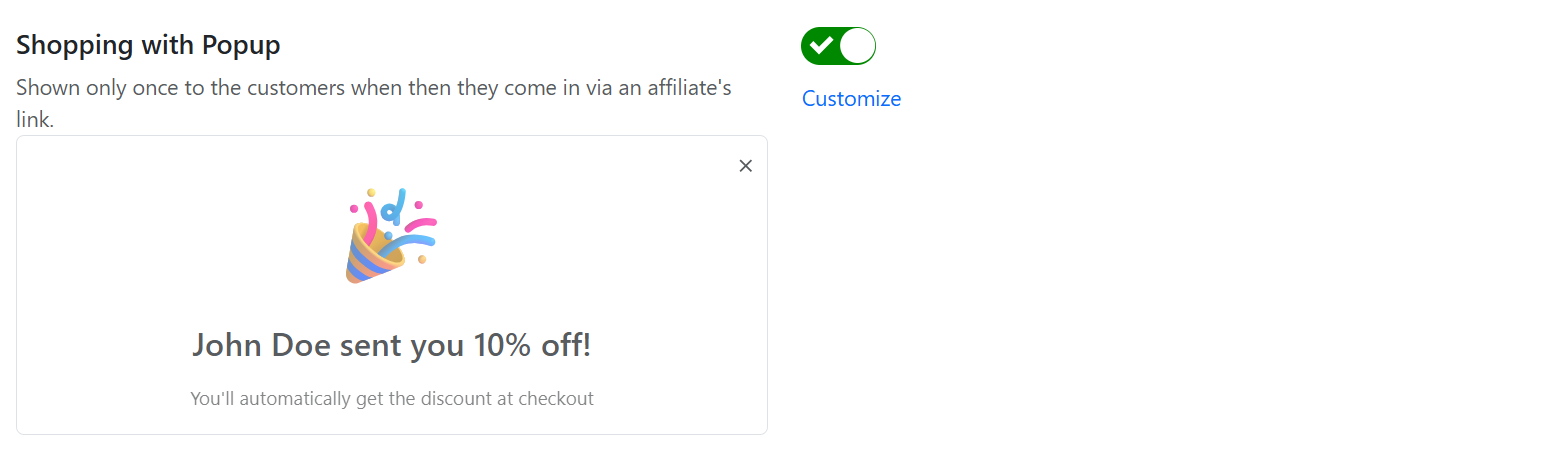
Display a [shopping with popup](https://docs.goaffpro.com/affiliate-portal-customization/toolbars/setup-shopping-with-popup) to customers when they visit your store using an affiliate's referral link.&#x20;

You can enable this from the Look and Feel > Toolbars > Shopping with Popup section.&#x20;

<figure><img src="https://1200686697-files.gitbook.io/~/files/v0/b/gitbook-x-prod.appspot.com/o/spaces%2F-LdPzLtyP46oY7cyXnkw%2Fuploads%2F4vKGXbhEMd9uxyp4Owxp%2Fimage.png?alt=media&#x26;token=743e820f-9028-4819-85fe-628e9ae6f26c" alt=""><figcaption><p>Look and Feel > Toolbars > Shopping with Popup</p></figcaption></figure>

***

### August 2025

#### Chat Widget Integration

Integrate a [chat widget](https://docs.goaffpro.com/affiliate-portal-customization/advanced-customization/chat-widget-integration) into your affiliate portal. This will allow you to chat with your affiliates.&#x20;

You can integrate it by pasting the widget code (from the chat service) to the Look and Feel > Affiliate Dashboard > Custom Javascript Code section.

<figure><img src="https://1200686697-files.gitbook.io/~/files/v0/b/gitbook-x-prod.appspot.com/o/spaces%2F-LdPzLtyP46oY7cyXnkw%2Fuploads%2FgfKCghqzdD3rAuT0mWE3%2Fimage.png?alt=media&#x26;token=8f17ec48-d145-4e0d-a239-fe1d760f7654" alt=""><figcaption><p>Look and Feel > Affiliate Dashboard > Custom JavaScript Code section</p></figcaption></figure>

#### Click to Conversion Window

Set a [timeframe](https://docs.goaffpro.com/program-settings/advanced-settings/set-click-to-conversion-window) during which a referred customer must make a purchase for the affiliate to receive credit for that sale. It can help in preventing fraud, such as cookie stuffing on the order confirmation page through browser extensions.

You can set it from the Settings > Advanced > Click to Conversion window section.

<figure><img src="https://1200686697-files.gitbook.io/~/files/v0/b/gitbook-x-prod.appspot.com/o/spaces%2F-LdPzLtyP46oY7cyXnkw%2Fuploads%2FJtjzf4RHe5bmqLMxOHGv%2Fimage.png?alt=media&#x26;token=1660ee49-a66b-4a68-9382-9dddc1b2c117" alt=""><figcaption><p>Settings > Advanced > Click to Conversion window</p></figcaption></figure>

Here, you can set the minimum and maximum time.&#x20;

<figure><img src="https://1200686697-files.gitbook.io/~/files/v0/b/gitbook-x-prod.appspot.com/o/spaces%2F-LdPzLtyP46oY7cyXnkw%2Fuploads%2FegVgriSQh45RE14xQ7Bc%2FScreenshot%202025-09-17%201329582.png?alt=media&#x26;token=dd5447f9-ba8a-476a-ab17-fb26576a5fa7" alt=""><figcaption><p>Update the click to conversion window</p></figcaption></figure>

#### Tracking Performance

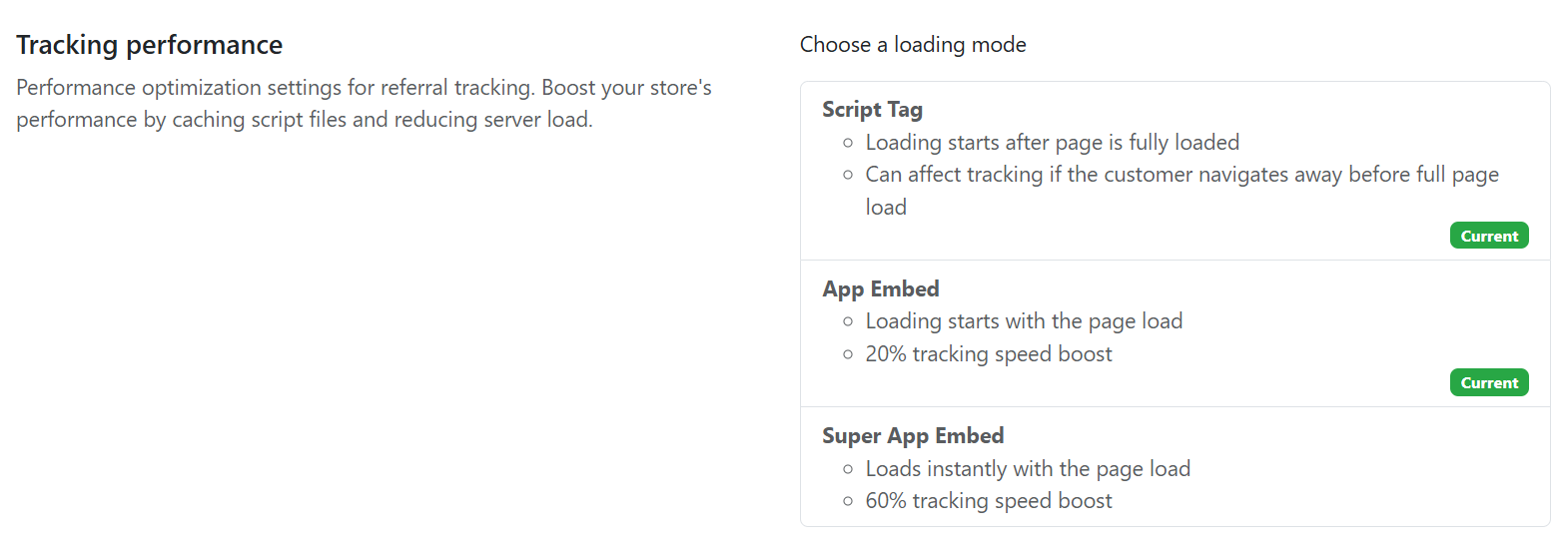
Optimize the referral tracking performance of your affiliate program. It lets you improve your store's performance by caching script files and decreasing server load.

You can set this from the Settings > Advanced > Tracking Performance section.
<figure><img src="https://1200686697-files.gitbook.io/~/files/v0/b/gitbook-x-prod.appspot.com/o/spaces%2F-LdPzLtyP46oY7cyXnkw%2Fuploads%2FWJeU3iXxjwVFJUPy50nw%2Fimage.png?alt=media&#x26;token=24dab040-95a9-4988-a4de-5f3d5e3e1e71" alt=""><figcaption><p>Settings > Advanced > Tracking Performance</p></figcaption></figure>

#### Block Google Ads Update

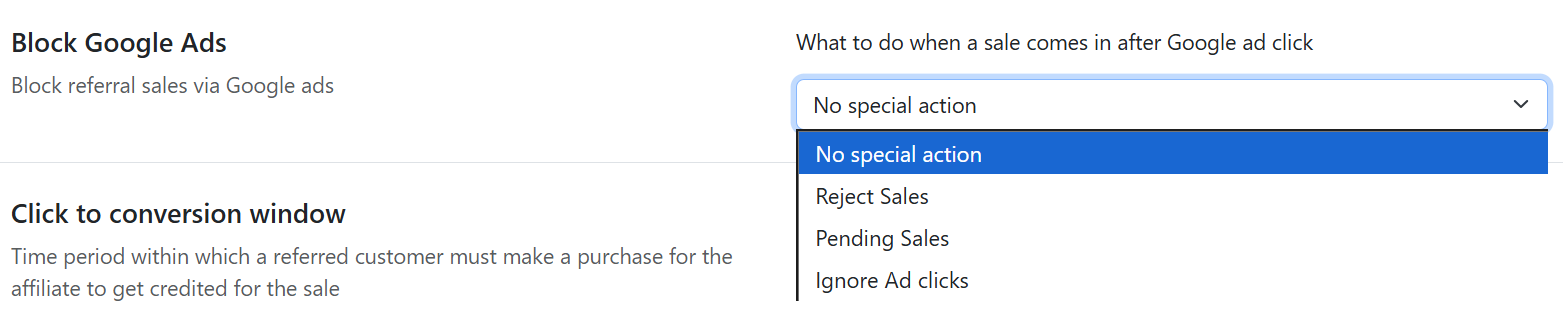
The [Block Google Ads](https://docs.goaffpro.com/program-settings/advanced-settings/block-commission-from-google-ads) feature has been updated. It now lets you set sales made through Google ad clicks to a pending sale status or to ignore ad clicks.&#x20;

You can set this from the Settings > Advanced > Block Google Ads section.

<figure><img src="https://1200686697-files.gitbook.io/~/files/v0/b/gitbook-x-prod.appspot.com/o/spaces%2F-LdPzLtyP46oY7cyXnkw%2Fuploads%2FGvaBFaYFj4A34gRopjXP%2Fimage.png?alt=media&#x26;token=23246d0b-9e71-479e-82bd-3bd96fa6e068" alt=""><figcaption><p>Settings > Advanced > Block Google Ads</p></figcaption></figure>

***

### July 2025

#### Automatic Coupons Configuration&#x20;

Set up the [customer eligibility](https://docs.goaffpro.com/affiliate-coupons/setup-referral-coupons/automatically-generate-coupons/set-customer-segment) and [minimum cart quantity](https://docs.goaffpro.com/affiliate-coupons/setup-referral-coupons/automatically-generate-coupons/set-minimum-cart-quantity) for affiliate coupons.&#x20;

You can set them from the Coupons > Automatic Coupons > Click on Change > Advanced section.&#x20;

<figure><img src="https://1200686697-files.gitbook.io/~/files/v0/b/gitbook-x-prod.appspot.com/o/spaces%2F-LdPzLtyP46oY7cyXnkw%2Fuploads%2FEnxPIpI7PrRz1JjdLaHE%2FScreenshot%202025-08-15%201716353.png?alt=media&#x26;token=eaef05c6-f3b2-46a0-9c07-5b9751d4cfe2" alt=""><figcaption><p>Coupons > Automatic Coupons > Click on Change > Advanced section</p></figcaption></figure>

#### Hyper Wallet Integration

Make payments to affiliates from within GoAffPro using Hyperwallet.&#x20;

You can integrate it from the Settings > Integrations > Hyperwallet section.&#x20;

<figure><img src="https://1200686697-files.gitbook.io/~/files/v0/b/gitbook-x-prod.appspot.com/o/spaces%2F-LdPzLtyP46oY7cyXnkw%2Fuploads%2FPNXOCwb6bJ7fqZnEroVK%2Fimage.png?alt=media&#x26;token=ffe11699-a939-415b-97ee-9d86fc9ddbd0" alt=""><figcaption><p>Settings > Integrations > Hyperwallet section</p></figcaption></figure>

***

### June 2025

#### Bulk Tools Feature

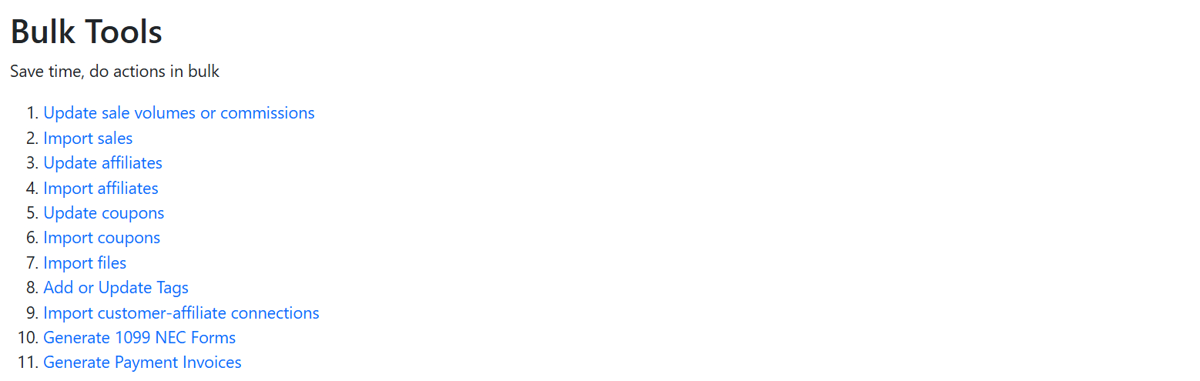
Use bulk tools to perform [bulk operations](https://docs.goaffpro.com/program-settings/extra-settings/use-bulk-tools) such as importing or updating sales, commissions, affiliates, coupons, and customers in your affiliate program.

You can enable the Bulk Tools option from the Settings > Extras section.&#x20;

<figure><img src="https://1200686697-files.gitbook.io/~/files/v0/b/gitbook-x-prod.appspot.com/o/spaces%2F-LdPzLtyP46oY7cyXnkw%2Fuploads%2F5M0E5jXTpDuvbIRbaaZD%2Fimage.png?alt=media&#x26;token=ad084bf1-338f-4eda-9b56-543f9155a67e" alt=""><figcaption><p>Settings > Extras > Bulk Tools</p></figcaption></figure>

After this, go to the Bulk Tools tab in your admin panel.

<figure><img src="https://1200686697-files.gitbook.io/~/files/v0/b/gitbook-x-prod.appspot.com/o/spaces%2F-LdPzLtyP46oY7cyXnkw%2Fuploads%2FgPH1lG4Olfsr3qx7t93f%2Fimage.png?alt=media&#x26;token=8be3eaf2-dabe-4acd-bd7c-f2302fe5caaa" alt=""><figcaption><p>Bulk Tools</p></figcaption></figure>

#### Notification Language Preference

Preferred language option has been added to the affiliate's notification preferences, ensuring that email notifications are sent to the affiliate in this language.

You can set this from the Affiliates > All Affiliates > Click on the affiliate's name to open their profile page > Settings > Notification Preferences section.&#x20;

<figure><img src="https://1200686697-files.gitbook.io/~/files/v0/b/gitbook-x-prod.appspot.com/o/spaces%2F-LdPzLtyP46oY7cyXnkw%2Fuploads%2FrQU9EPbHBS8zhysPu8V4%2FScreenshot%202025-08-15%201852354.png?alt=media&#x26;token=72400bb3-251d-4787-9b53-a86ff8d1c823" alt=""><figcaption><p>Affiliates > All Affiliates > Click on the affiliate's name > Settings > Notification Preferences section</p></figcaption></figure>

#### Declare VAT Exemption

Allow affiliates to declare VAT exemption on their commission payouts.

You can enable it from the Settings > Payments > Withholding Tax/Retention Tax/TDS/VAT section.&#x20;

<figure><img src="https://1200686697-files.gitbook.io/~/files/v0/b/gitbook-x-prod.appspot.com/o/spaces%2F-LdPzLtyP46oY7cyXnkw%2Fuploads%2FrHr5SPJYlRDgSfJlt1ez%2FScreenshot%202025-08-15%201853542.png?alt=media&#x26;token=bdc59cb1-d0c0-4484-9da3-bd8b58e09b59" alt=""><figcaption><p>Settings > Payments > Withholding Tax/Retention Tax/TDS/VAT section</p></figcaption></figure>

***

### May 2025 <a href="#m_-2072715249813402738m_3958914691557586224gmail-may-2025" id="m_-2072715249813402738m_3958914691557586224gmail-may-2025"></a>

#### SPF Record <a href="#m_-2072715249813402738m_3958914691557586224m_314797387393480398gmail-march-2025" id="m_-2072715249813402738m_3958914691557586224m_314797387393480398gmail-march-2025"></a>

Create an [SPF record](https://docs.goaffpro.com/affiliate-email/set-notification-email-address/create-spf-record) to verify the authenticity of emails from your domain. This ensures that they are not marked as spam by the recipient's email provider.

You can create it from the Settings > Notifications > From Email section.&#x20;

<figure><img src="https://1200686697-files.gitbook.io/~/files/v0/b/gitbook-x-prod.appspot.com/o/spaces%2F-LdPzLtyP46oY7cyXnkw%2Fuploads%2FMniDxLyuWfM5YA0eocyF%2FScreenshot%202025-08-22%20203630.png?alt=media&#x26;token=8ae5445d-e0c2-4815-9aef-f9c1c540858c" alt=""><figcaption><p>Settings > Notifications > From Email section</p></figcaption></figure>

#### Customize Affiliate Referral Link <a href="#m_-2072715249813402738m_3958914691557586224m_314797387393480398gmail-march-2025" id="m_-2072715249813402738m_3958914691557586224m_314797387393480398gmail-march-2025"></a>

The referral link customization window has been updated. It now allows you to disable the referral link, change the landing page, customize the referral code, and shorten the link.

You can set this from the Affiliates > All Affiliates section. After this, click on the affiliate's name to open their profile page > Referral Link option.&#x20;

<figure><img src="https://1200686697-files.gitbook.io/~/files/v0/b/gitbook-x-prod.appspot.com/o/spaces%2F-LdPzLtyP46oY7cyXnkw%2Fuploads%2FH0oshD7NfoHkHJvyGjuQ%2FScreenshot%202025-08-22%20204835.png?alt=media&#x26;token=7fb330e8-f5cb-4026-9e6c-a388e87d4f86" alt=""><figcaption><p>Affiliates > All Affiliates > Click on the affiliate's name > Referral Link option</p></figcaption></figure>

#### Affiliate Gifts <a href="#m_-2072715249813402738m_3958914691557586224m_314797387393480398gmail-march-2025" id="m_-2072715249813402738m_3958914691557586224m_314797387393480398gmail-march-2025"></a>

Set up [gifts for affiliates](https://docs.goaffpro.com/affiliate-coupons/setup-gifts-for-affiliates) by creating a gift template and assigning it to them. Affiliates can redeem these gifts directly from their dashboard. You also have the option to set up gifts for group affiliates.&#x20;

You can set up gifts from the Coupons > Gifts section.&#x20;

<figure><img src="https://1200686697-files.gitbook.io/~/files/v0/b/gitbook-x-prod.appspot.com/o/spaces%2F-LdPzLtyP46oY7cyXnkw%2Fuploads%2F4Vd0DguKwrqW9tO8yG1G%2Fimage.png?alt=media&#x26;token=4c25bad0-cbb7-4a4c-830a-3c195dc03706" alt=""><figcaption><p>Coupons > Gifts</p></figcaption></figure>

***

### April 2025

#### Affiliate Payment Settings

The affiliate payment settings section has been updated. All payment settings, such as payment method, minimum payout amount, and commission hold time, are now located in the same section.

You can go to the Affiliates > All Affiliates section. Then, click on the affiliate's name to open their profile page. Next, go to Settings > Payment Settings section > click on Edit.

<figure><img src="https://1200686697-files.gitbook.io/~/files/v0/b/gitbook-x-prod.appspot.com/o/spaces%2F-LdPzLtyP46oY7cyXnkw%2Fuploads%2FCWVENc7OTwJOSt8jE6vu%2Fimage.png?alt=media&#x26;token=8ba8c953-99c8-4656-b9a7-8f07da8e0b21" alt=""><figcaption><p>Affiliates > All Affiliates > Click on the affiliate's name > Affiliate Profile > Settings > Payment Settings</p></figcaption></figure>

Here, you can set up the payment method and details, minimum payout amount, and commission hold time for the affiliate. &#x20;

<figure><img src="https://1200686697-files.gitbook.io/~/files/v0/b/gitbook-x-prod.appspot.com/o/spaces%2F-LdPzLtyP46oY7cyXnkw%2Fuploads%2FtctgGqaGVTQwOvLdyW9S%2Fimage.png?alt=media&#x26;token=f128e387-d292-4e27-a990-564e8b2b0bae" alt=""><figcaption><p>Payment Settings</p></figcaption></figure>

***

### March 2025

#### Coupon Template for Group

Set up [coupon templates](https://docs.goaffpro.com/affiliate-commissions/create-commission-groups-for-affiliates/group-configuration/set-coupon-template) for affiliate groups to configure different coupons for each group.

You can set it from the Groups > Edit Group > Group Configuration > Customer discount option.&#x20;

<figure><img src="https://1200686697-files.gitbook.io/~/files/v0/b/gitbook-x-prod.appspot.com/o/spaces%2F-LdPzLtyP46oY7cyXnkw%2Fuploads%2FRwuPCgI2vCuHrsm2QIq5%2FScreenshot%202025-08-22%20225535.png?alt=media&#x26;token=7fd2500f-053c-4a9b-a908-634f891d223e" alt=""><figcaption><p>Groups > Edit Group > Group Configuration > Customer discount section</p></figcaption></figure>

#### &#xD;Welcome Email for Group

Set up a [custom welcome email](https://docs.goaffpro.com/affiliate-commissions/create-commission-groups-for-affiliates/group-configuration/set-welcome-email) for the affiliate group. When affiliates register and are added to this group, they will receive the welcome email.

You can set it from the Groups > Edit Group > Group Configuration > Other Configuration option.&#x20;

<figure><img src="https://1200686697-files.gitbook.io/~/files/v0/b/gitbook-x-prod.appspot.com/o/spaces%2F-LdPzLtyP46oY7cyXnkw%2Fuploads%2F0ZF1TJg84w1ussUWAVKl%2FScreenshot%202025-08-22%20225715.png?alt=media&#x26;token=ad579048-cf88-4f29-9349-cbc6b5876d12" alt=""><figcaption><p>Groups > Edit Group > Group Configuration > Other configuration</p></figcaption></figure>

Here, you can select the custom email.&#x20;

<figure><img src="https://1200686697-files.gitbook.io/~/files/v0/b/gitbook-x-prod.appspot.com/o/spaces%2F-LdPzLtyP46oY7cyXnkw%2Fuploads%2FeSX2AnTcj0oIzEPvZVQO%2FScreenshot%202025-08-22%202257304.png?alt=media&#x26;token=d1a86c00-29e5-4a70-96c8-3ae14f782c94" alt=""><figcaption><p>Select the custom email</p></figcaption></figure>

#### &#xD;Custom Email Notification

Create [custom email notification](https://docs.goaffpro.com/affiliate-email/set-email-notifications-for-affiliates/create-custom-email-notifications) templates for affiliates. These notifications can be used for automations or as custom welcome emails for groups.

You can create these custom email templates from Settings > Notifications > Affiliate's Notifications > Customize Template > New Customer Notifications.

<figure><img src="https://1200686697-files.gitbook.io/~/files/v0/b/gitbook-x-prod.appspot.com/o/spaces%2F-LdPzLtyP46oY7cyXnkw%2Fuploads%2FTbJSaqqKt9ysi1lzrxxn%2FScreenshot%202025-08-22%202308453.png?alt=media&#x26;token=cba87064-4b72-40ce-a44f-fcb9cb1bceab" alt=""><figcaption><p>Settings > Notifications > Affiliate's Notifications Customize Template > Custom notification</p></figcaption></figure>

#### &#xD;Invoices Update

The invoice feature now lets you create multiple invoice templates.&#x20;

You can create it from the Settings > Extras > Invoices > New Invoice template.&#x20;

<figure><img src="https://1200686697-files.gitbook.io/~/files/v0/b/gitbook-x-prod.appspot.com/o/spaces%2F-LdPzLtyP46oY7cyXnkw%2Fuploads%2Fw6NopHGGzpDywFukSHCN%2Fimage.png?alt=media&#x26;token=987fd1a9-971e-41b6-94dc-ee58b13cb2c2" alt=""><figcaption><p>Settings > Extras > Invoices > New Invoice template</p></figcaption></figure>

***

### February 2025

#### Disable Commission on Self Referral

The "Disable Commission for Self Referral" option has been renamed to "Do not record personal purchases." This allows you to prevent affiliates from earning commissions on their own purchases in the store.

You can enable this from the Settings > General > Sales section.&#x20;

<figure><img src="https://1200686697-files.gitbook.io/~/files/v0/b/gitbook-x-prod.appspot.com/o/spaces%2F-LdPzLtyP46oY7cyXnkw%2Fuploads%2F9aVAwvcf5XZMw7Bdgj3j%2FScreenshot%202025-08-29%202010284.png?alt=media&#x26;token=94ea74a4-a7ae-48d0-b672-98ea620bda86" alt=""><figcaption><p>Settings > General > Sales section</p></figcaption></figure>

***

### January 2025

#### 1099-NEC form

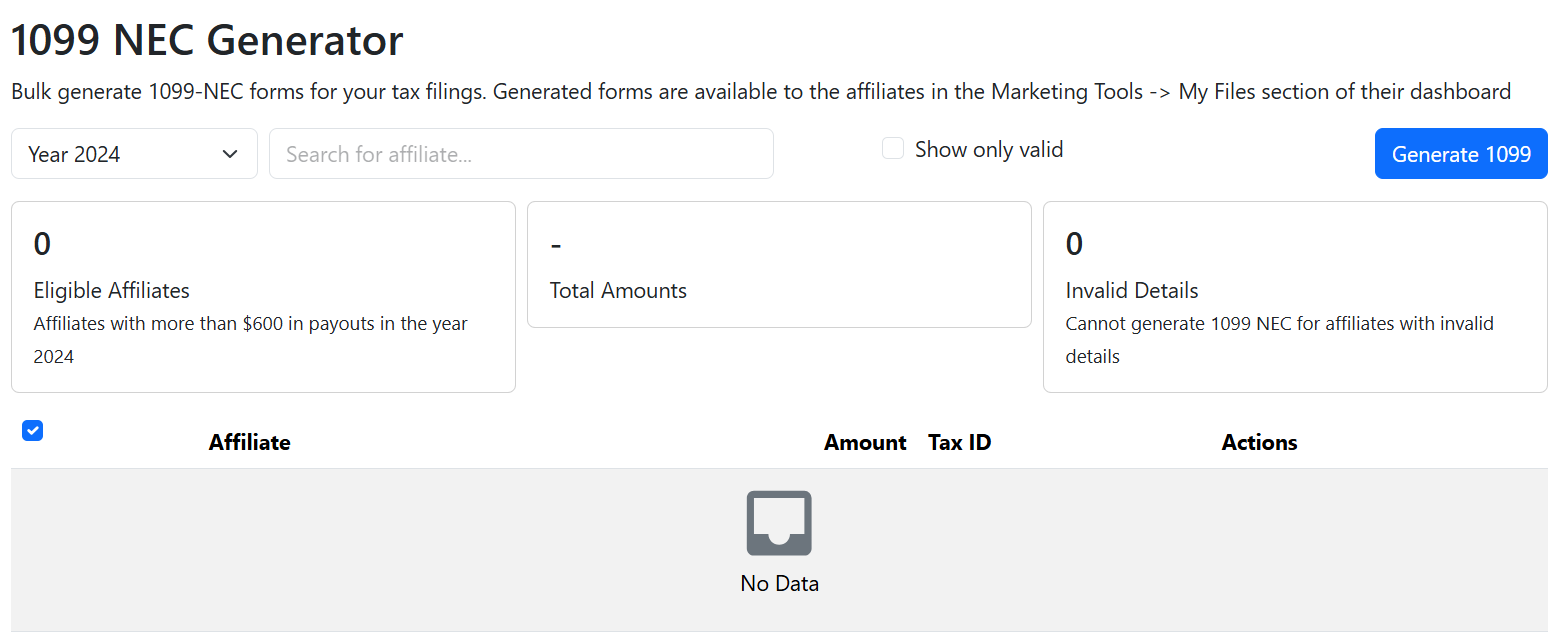
Generate and issue the [1099-NEC form](https://docs.goaffpro.com/program-settings/extra-settings/w9-form-for-affiliates/generate-1099-nec-form-for-affiliates) for your affiliates for your tax filings.&#x20;

You can generate them from the Settings > Extras > W9 Form section.&#x20;

<figure><img src="https://1200686697-files.gitbook.io/~/files/v0/b/gitbook-x-prod.appspot.com/o/spaces%2F-LdPzLtyP46oY7cyXnkw%2Fuploads%2FYI0gC5JBYV1ZB4NDR4U0%2FScreenshot%202025-08-29%202221584.png?alt=media&#x26;token=059f09ba-b75d-4fb0-a4c0-45d701eb31b9" alt=""><figcaption><p>Settings > Extras > W9 Form</p></figcaption></figure>

Here, you generate the 1099-NEC form for the eligible affiliates in your program.&#x20;

<figure><img src="https://1200686697-files.gitbook.io/~/files/v0/b/gitbook-x-prod.appspot.com/o/spaces%2F-LdPzLtyP46oY7cyXnkw%2Fuploads%2FnNmKCoYnijLnLzk3iUyw%2Fimage.png?alt=media&#x26;token=bb9fc7c8-7d19-42ed-82c5-bc931b33cfa6" alt=""><figcaption><p>1099 NEC Generator</p></figcaption></figure>

#### Social Media Campaign Tracking

Track the performance of social media campaigns and posts made by affiliates using the social media campaign tracking option.&#x20;

You can enable the Bulk Tools option from the Settings > Extras section.&#x20;

<figure><img src="https://1200686697-files.gitbook.io/~/files/v0/b/gitbook-x-prod.appspot.com/o/spaces%2F-LdPzLtyP46oY7cyXnkw%2Fuploads%2F6U3KOPoJBRGhfZk3RmFA%2Fimage.png?alt=media&#x26;token=6149892a-38e7-4b98-80a9-67a36a68fc2d" alt=""><figcaption></figcaption></figure>

After this, go to the Social Media tab in your admin panel. Here, you can set up campaign tracking for your affiliates.&#x20;

<figure><img src="https://1200686697-files.gitbook.io/~/files/v0/b/gitbook-x-prod.appspot.com/o/spaces%2F-LdPzLtyP46oY7cyXnkw%2Fuploads%2FyPR2NIBhiZtI90RDdqGi%2Fimage.png?alt=media&#x26;token=8ca7e268-cc4e-4f6b-bcf6-b7bbc773e994" alt=""><figcaption><p>Campaigns</p></figcaption></figure>

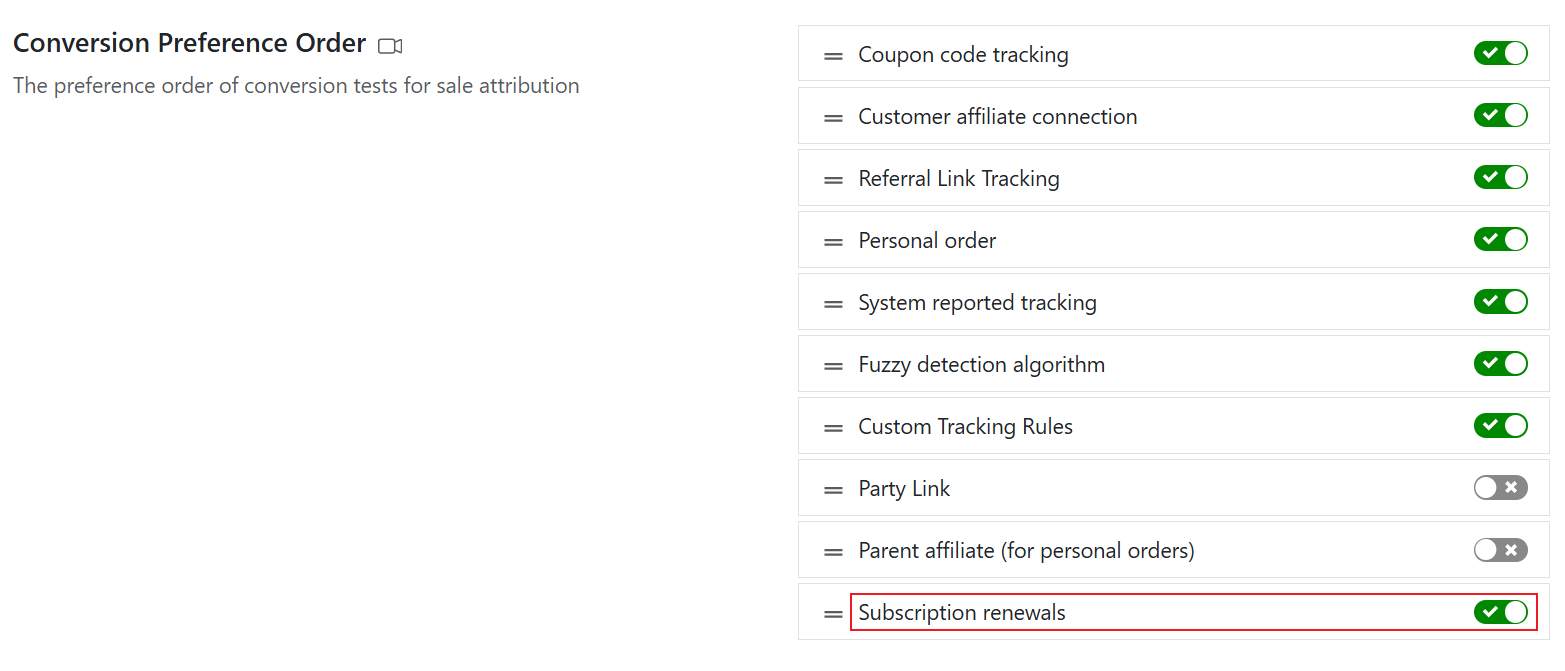
#### Commission on Subscription Renewals

Give commissions to affiliates on subscription renewals of customers.&#x20;

To enable this, go to the Settings > Advanced > Conversion Preference Order section.&#x20;

<figure><img src="https://1200686697-files.gitbook.io/~/files/v0/b/gitbook-x-prod.appspot.com/o/spaces%2F-LdPzLtyP46oY7cyXnkw%2Fuploads%2FWxAGk8X7py2ud8gHtByf%2FScreenshot%202025-08-29%20223752.png?alt=media&#x26;token=1e671213-5ffb-46a8-8e67-d46ebeb4e21a" alt=""><figcaption><p>Settings > Advanced > Conversion Preference Order</p></figcaption></figure>

***

### December 2024

#### Configure Cookie Consent

Set up the loading of the tracking code according to the customer's cookie consent preference.&#x20;

You can set this from the Settings > Advanced > Custom cookie consent section.

<figure><img src="https://1200686697-files.gitbook.io/~/files/v0/b/gitbook-x-prod.appspot.com/o/spaces%2F-LdPzLtyP46oY7cyXnkw%2Fuploads%2F108xCzAvmYigcPy9tuMj%2Fimage.png?alt=media&#x26;token=36ec72cb-98c1-4f18-9b29-e673965783a9" alt=""><figcaption><p>Settings > Advanced > Customer cookie consent</p></figcaption></figure>

#### Referral Link Settings

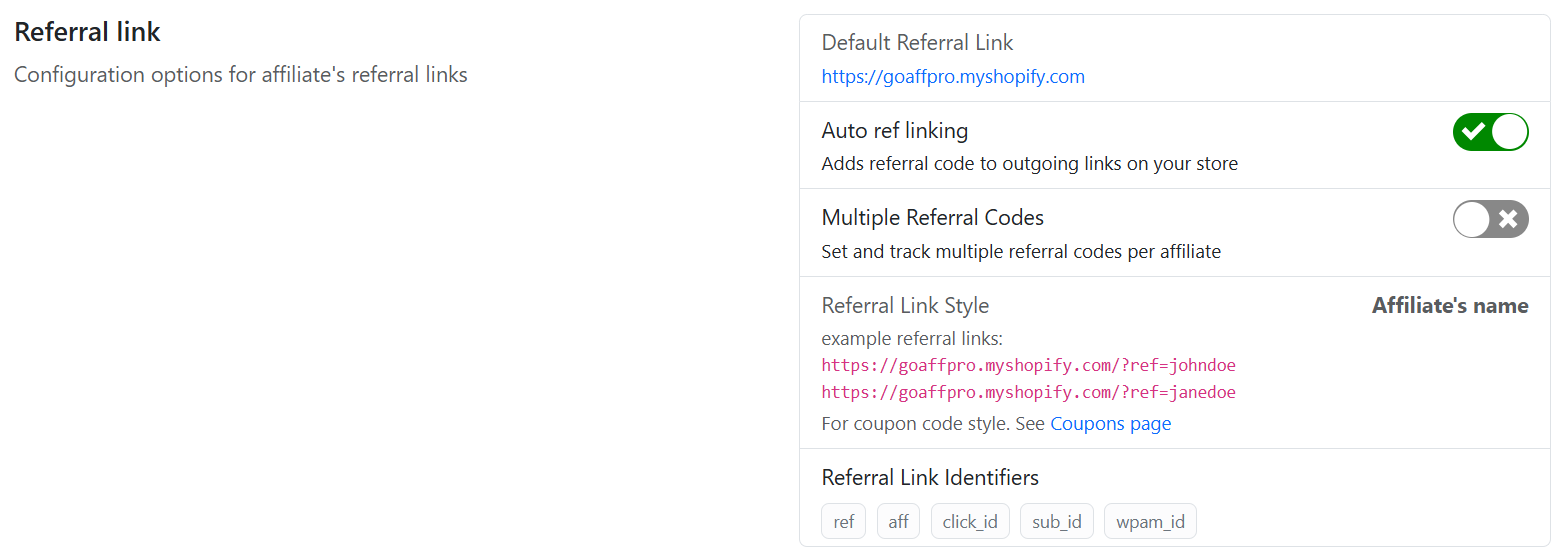
The [Referral Link settings](https://docs.goaffpro.com/program-settings/referral-link-configuration) have been updated. The following options are now consolidated under a single section:

* Default Referral Link
* Auto ref linking
* Multiple Referral Codes
* Referral Link Style
* Referral Link Identifiers

You can set them from the Settings > Advanced > Referral Link section.&#x20;

<figure><img src="https://1200686697-files.gitbook.io/~/files/v0/b/gitbook-x-prod.appspot.com/o/spaces%2F-LdPzLtyP46oY7cyXnkw%2Fuploads%2F6KrujrLnAp1Kq0QhEIhu%2Fimage.png?alt=media&#x26;token=c46ba6a6-2df8-411f-86d3-d83f75d6f556" alt=""><figcaption><p>Settings > Advanced > Referral Link section</p></figcaption></figure>

***

### November 2024

#### Store Credit Redemption at Checkout

Allows your affiliates to redeem their pending payment as store credits at the store checkout.

You can set this from the Settings > Payments > Supported Payment Methods section > Enable the "Show in checkout page" option.&#x20;

<figure><img src="https://1200686697-files.gitbook.io/~/files/v0/b/gitbook-x-prod.appspot.com/o/spaces%2F-LdPzLtyP46oY7cyXnkw%2Fuploads%2FfrvMRQmcYU3Byqd7e2OM%2FScreenshot%202025-09-17%20135941.png?alt=media&#x26;token=73dcefc5-148c-474c-8ca3-0cfba9fce807" alt=""><figcaption><p>Settings > Payments > Supported Payment Methods section</p></figcaption></figure>

#### Prevent Indexing of Affiliate Portal

Prevent search engines from indexing your affiliate portal pages.&#x20;

You can enable this from the Look and Feel > Store Profile > Prevent Indexing section.
<figure><img src="https://1200686697-files.gitbook.io/~/files/v0/b/gitbook-x-prod.appspot.com/o/spaces%2F-LdPzLtyP46oY7cyXnkw%2Fuploads%2FwfNJDkwOXVN6rSmeU3Fv%2Fimage.png?alt=media&#x26;token=e05de8ec-8802-4157-81a9-71bd739a92e3" alt=""><figcaption><p>Look and Feel > Store Profile > Prevent Indexing</p></figcaption></figure>

***

### October 2024

#### Coupon Templates

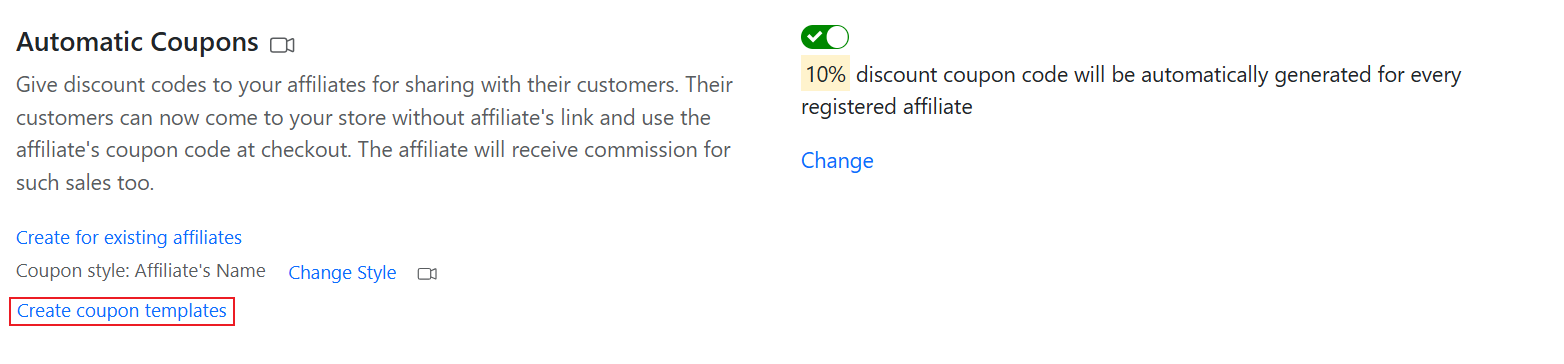
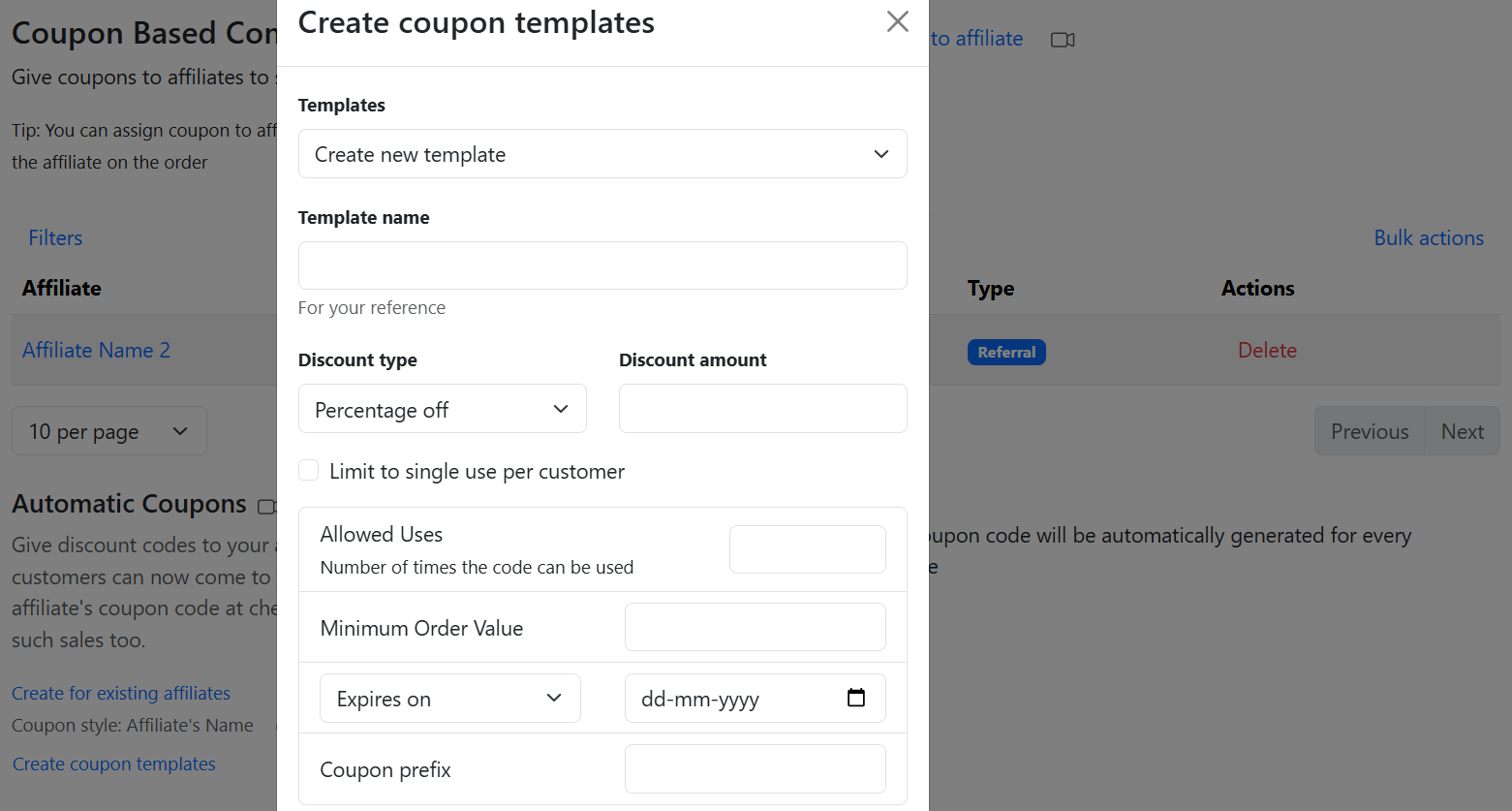
Create [coupon templates ](https://docs.goaffpro.com/affiliate-coupons/setup-referral-coupons/create-coupon-templates)with custom configurations and assign coupons to affiliates using that template.&#x20;

You can create the coupon template from the Coupons > Automatic Coupons > Create coupon template option.&#x20;
<figure><img src="https://1200686697-files.gitbook.io/~/files/v0/b/gitbook-x-prod.appspot.com/o/spaces%2F-LdPzLtyP46oY7cyXnkw%2Fuploads%2FimwaH0r2GQDarcWmC3c0%2FScreenshot%202025-09-17%202218194.png?alt=media&#x26;token=2d749c9a-8d11-47bb-93e3-e95eea09a301" alt=""><figcaption><p>Coupons > Automatic Coupons > Create coupon template</p></figcaption></figure>

Here, you can create the coupon template and then [assign coupons](https://docs.goaffpro.com/affiliate-coupons/setup-referral-coupons/create-coupon-templates#assign-coupon-to-the-affiliate) to affiliates using that template.

<figure><img src="https://1200686697-files.gitbook.io/~/files/v0/b/gitbook-x-prod.appspot.com/o/spaces%2F-LdPzLtyP46oY7cyXnkw%2Fuploads%2FlK5vT9IBjZr40shMMs04%2Fimage.png?alt=media&#x26;token=6ad2c57b-0bb0-4558-a98e-96dcc867fc62" alt=""><figcaption><p>Create coupon template</p></figcaption></figure>

#### Personal Coupon Templates

Create [personal coupon templates](https://docs.goaffpro.com/affiliate-coupons/setup-personal-coupons/create-personal-coupon-templates) with custom configurations and assign personal coupons to affiliates using that template.&#x20;

You can create the coupon template from the Coupons > Personal Coupons > Create coupon template option.&#x20;

<figure><img src="https://1200686697-files.gitbook.io/~/files/v0/b/gitbook-x-prod.appspot.com/o/spaces%2F-LdPzLtyP46oY7cyXnkw%2Fuploads%2FrcpdnLQGgjJFAP8dROOf%2FScreenshot%202025-09-17%202223544.png?alt=media&#x26;token=1211e158-2286-4cda-803a-b22215d50916" alt=""><figcaption><p>Coupons > Personal Coupons > Create coupon template</p></figcaption></figure>

#### Affiliate Manager

Give a user [account access](https://docs.goaffpro.com/program-management/manage-affiliates/affiliate-profile-settings/set-affiliate-manager) to the dashboard of other affiliates.&#x20;

You can set this from the Affiliates > All Affiliates section. Click on the affiliate's name to open their profile page. Next, go to Settings > Manage other affiliates section.

<figure><img src="https://1200686697-files.gitbook.io/~/files/v0/b/gitbook-x-prod.appspot.com/o/spaces%2F-LdPzLtyP46oY7cyXnkw%2Fuploads%2FAP1ObWWHUdjNnUCCmc8Y%2Fimage.png?alt=media&#x26;token=3e7886f7-79dd-4d2c-871d-e4514ed80ad1" alt=""><figcaption><p>Affiliates > All Affiliates > Click on the affiliate's name > Affiliate Profile > Settings > Manage other affiliates</p></figcaption></figure>

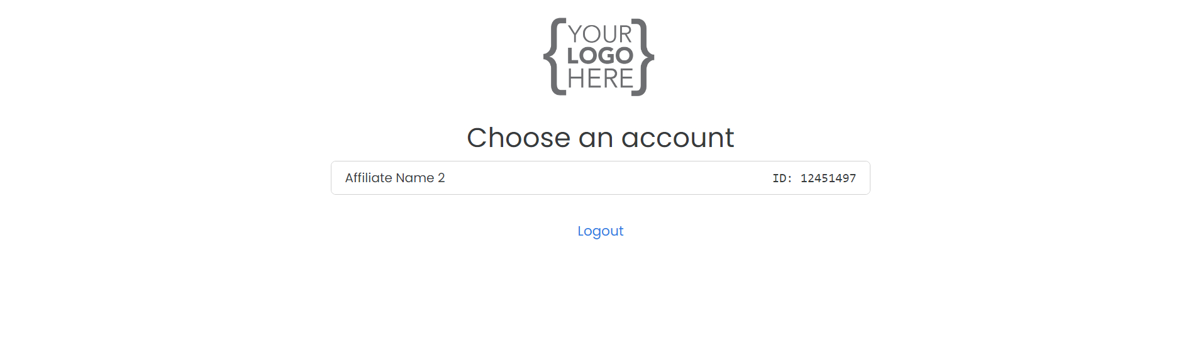
When this account user logs into their dashboard, they can select the affiliate account they wish to access. The account you provide access to will not have its own dashboard; instead, it will function as a manager for other affiliate accounts.

<figure><img src="https://1200686697-files.gitbook.io/~/files/v0/b/gitbook-x-prod.appspot.com/o/spaces%2F-LdPzLtyP46oY7cyXnkw%2Fuploads%2F34oZ4Xpbw3U5YZSgCb09%2Fimage.png?alt=media&#x26;token=93c7b0b3-82e5-4356-b64e-11d4a311c607" alt=""><figcaption><p>Affiliate account access</p></figcaption></figure>

***

### September 2024

#### Post Checkout Popup Update (Shopify)

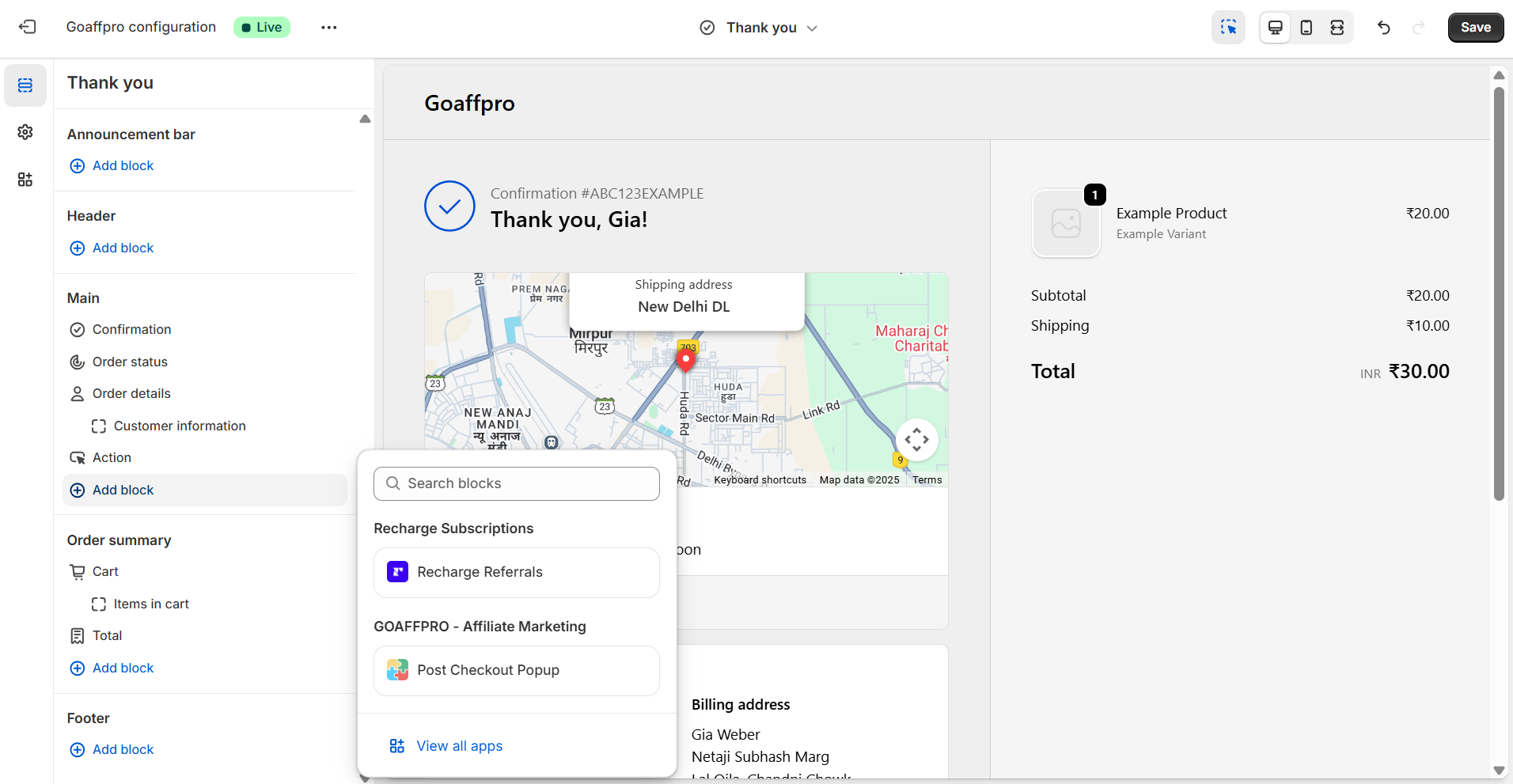
To enable the Post Checkout Popup in Shopify stores, merchants must now integrate the [post checkout popup block](https://docs.goaffpro.com/how-tos/setup-post-checkout-popup/shopify-popup-integration) into the thank you page.&#x20;

You can do this from the Shopify admin panel > Online Stores > Theme > Customize. Here, go to Checkout and new customer accounts page > Thank you page > Add app block > Select Post Checkout Popup block.&#x20;

<figure><img src="https://1200686697-files.gitbook.io/~/files/v0/b/gitbook-x-prod.appspot.com/o/spaces%2F-LdPzLtyP46oY7cyXnkw%2Fuploads%2FqLnvTEOgENzhcV80vEbz%2Fimage.png?alt=media&#x26;token=ee133e1b-2ceb-453e-9359-3c1ffda6dd1c" alt=""><figcaption><p>Shopify admin panel > Online Stores > Theme > Customize > Checkout &#x26; new customers > Thank you > Add block > Post Checkout Popup</p></figcaption></figure>

#### Share A Cart&#x20;

Allow customers and affiliates to create and share cart links, enabling them to share links to pre-filled carts with others.

You can set this up from Look and Feel > Toolbars > Share A Cart option. You will need to add the [share a cart block](https://docs.goaffpro.com/affiliate-portal-customization/toolbars/setup-share-a-cart-button) to the cart page in your store theme.&#x20;
<figure><img src="https://1200686697-files.gitbook.io/~/files/v0/b/gitbook-x-prod.appspot.com/o/spaces%2F-LdPzLtyP46oY7cyXnkw%2Fuploads%2FFSuX5dp17YFfZNjkoOYL%2Fimage.png?alt=media&#x26;token=4ef3c0b0-898d-4ff9-973e-ae1eaf856c1d" alt=""><figcaption><p>Look and Feel > Toolbars > Share A Cart</p></figcaption></figure>

#### Mandatory W9 form Requirement for Affiliates

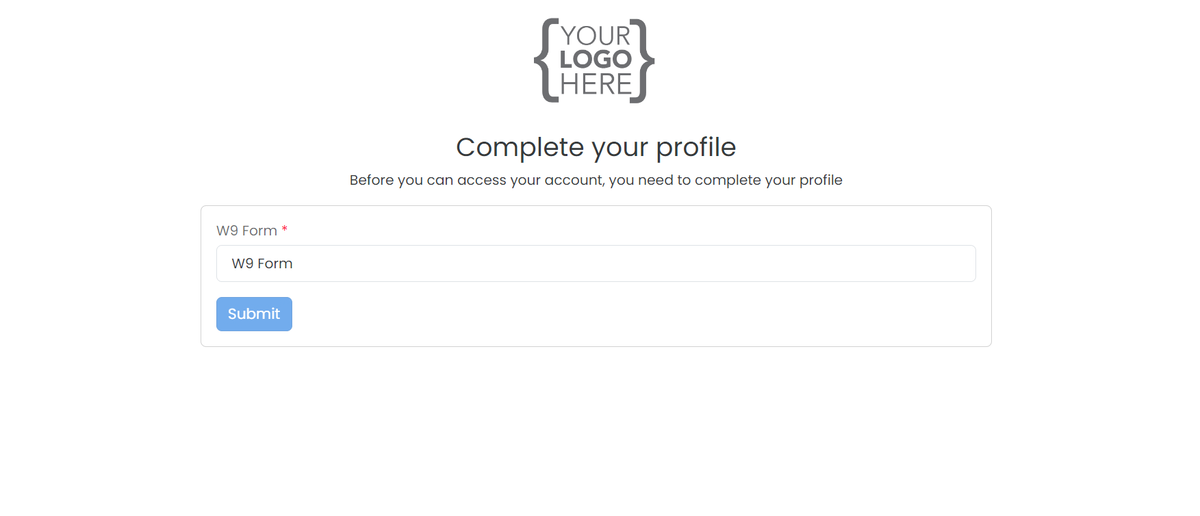
Make it [mandatory for affiliates](https://docs.goaffpro.com/program-settings/extra-settings/w9-form-for-affiliates/mandatory-w9-form-requirement-for-affiliates) to complete the W9 form, required for tax filing purposes.&#x20;

You can set this from the Look and Feel > Affiliate Dashboard > Dashboard Tabs > Edit Form. Create a W9 form profile field > Set it as required > Enable the "Disable dashboard access until the profile is completed" option.&#x20;

<figure><img src="https://1200686697-files.gitbook.io/~/files/v0/b/gitbook-x-prod.appspot.com/o/spaces%2F-LdPzLtyP46oY7cyXnkw%2Fuploads%2FhYs0bAyCBAHtsUkbpz8y%2Fimage.png?alt=media&#x26;token=f49c3b6e-d800-48a8-9386-80e1ef3fab44" alt=""><figcaption><p>Mandatory filling out of the W9 form</p></figcaption></figure>

***

### August 2024

#### Zendesk SSO

The Zendesk SSO integration allows logged in affiliates access to your zendesk helpdesk in their dashboard.&#x20;

You can integrate this from the Settings > Integrations > Zendesk SSO section.&#x20;
<figure><img src="https://1200686697-files.gitbook.io/~/files/v0/b/gitbook-x-prod.appspot.com/o/spaces%2F-LdPzLtyP46oY7cyXnkw%2Fuploads%2FHMwn5pHwH2JiEwApY99d%2Fimage.png?alt=media&#x26;token=eb66b466-8ff6-43eb-9d60-fcb23306faee" alt=""><figcaption><p>Settings > Integrations > Zendesk SSO</p></figcaption></figure>

#### Recruit Feature

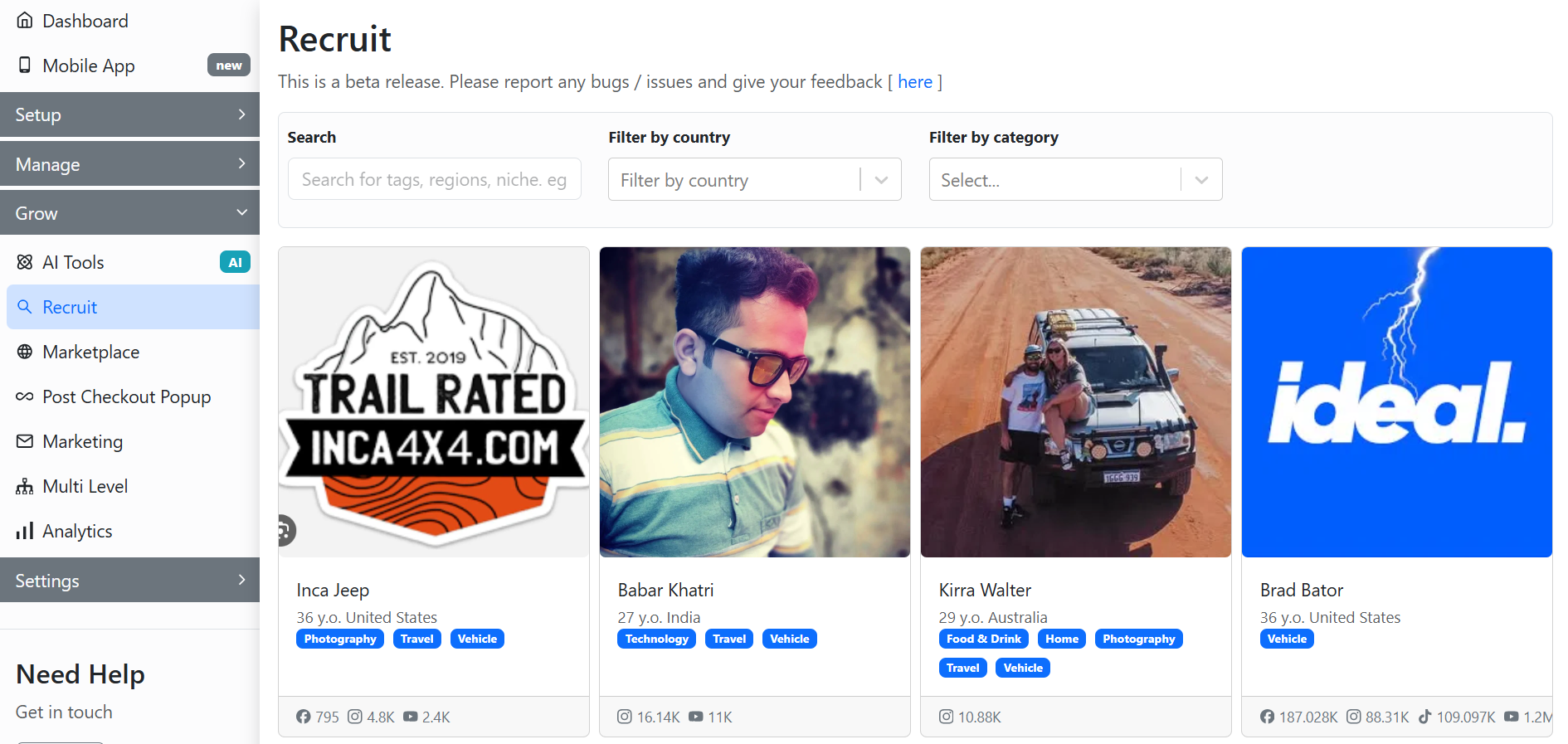
The recruit option allows you to [find and recruit influencers](https://docs.goaffpro.com/how-tos/recruiting-affiliates/recruit-influencers) for your affiliate program. It helps you locate influencers within your niche, region, or category, and lets you invite them to join your program.

You can go to the Recruit tab and search for influencers to invite from there.&#x20;

<figure><img src="https://1200686697-files.gitbook.io/~/files/v0/b/gitbook-x-prod.appspot.com/o/spaces%2F-LdPzLtyP46oY7cyXnkw%2Fuploads%2FNGIxk67wVaYNbvJSc5jJ%2Fimage.png?alt=media&#x26;token=58000cae-c0bb-4cbd-83b2-6690e63a3b99" alt=""><figcaption><p>Recruit</p></figcaption></figure>

***

### July 2024

#### Multi Level Commission Rules for Affiliate Groups

Set up rules to decide how multi-level commissions will be distributed for sales to group affiliates.

You can set this from the Groups > Edit Group > MLM Product commissions section > Create new rule.&#x20;

<figure><img src="https://1200686697-files.gitbook.io/~/files/v0/b/gitbook-x-prod.appspot.com/o/spaces%2F-LdPzLtyP46oY7cyXnkw%2Fuploads%2FgIfYrMVyx49uBdZS0ZUu%2FScreenshot%202025-10-22%20223717.png?alt=media&#x26;token=80fc3151-95aa-4a35-b671-201c3bdca28a" alt=""><figcaption><p>Groups > Edit Group > MLM Product commissions</p></figcaption></figure>

Here, you can [select the rule](https://docs.goaffpro.com/affiliate-commissions/create-commission-groups-for-affiliates/set-multi-level-commission-rules-for-group) and set the level rate for it.&#x20;

<figure><img src="https://1200686697-files.gitbook.io/~/files/v0/b/gitbook-x-prod.appspot.com/o/spaces%2F-LdPzLtyP46oY7cyXnkw%2Fuploads%2FhD5GV2PNekyOrrue58mv%2Fimage.png?alt=media&#x26;token=73ed7074-4615-4433-bafa-186b23893a72" alt=""><figcaption><p>Select the rule > Set the level commission</p></figcaption></figure>

***

### May 2024

#### Digital Assets for Affiliates

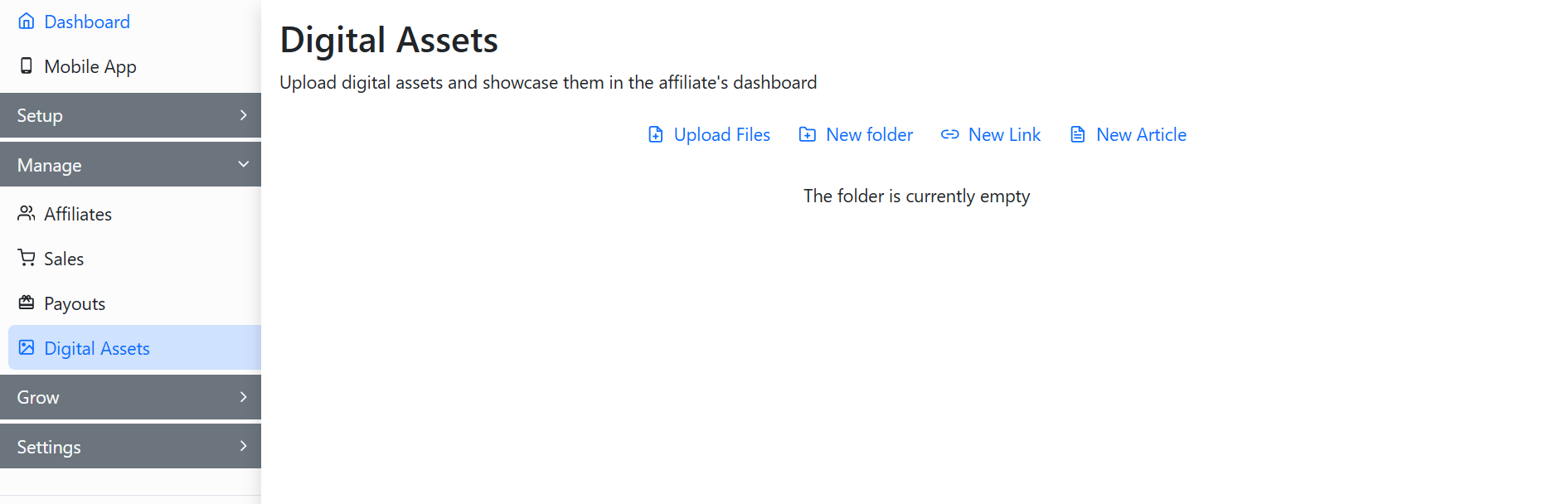
Upload [digital assets](https://docs.goaffpro.com/program-management/upload-digital-assets-for-affiliates) such as files, links, and articles for your affiliates. They can access these assets from their dashboard and utilize them for promotions.

You can go to the Digital Assets tab and upload assets from there.

<figure><img src="https://1200686697-files.gitbook.io/~/files/v0/b/gitbook-x-prod.appspot.com/o/spaces%2F-LdPzLtyP46oY7cyXnkw%2Fuploads%2FIeRWrnHK2jfrhT7vRDeA%2Fimage.png?alt=media&#x26;token=c324de2d-4376-47f8-9c65-ab49c8fd4dfb" alt=""><figcaption><p>Digital Assets</p></figcaption></figure>

#### Dynamic Coupons

Set up [dynamic coupons](https://docs.goaffpro.com/affiliate-coupons/enable-dynamic-coupons) for affiliates that generate unique codes automatically. When a customer clicks an affiliate link, the coupon is applied to their cart. The codes are valid for a set period and refresh automatically, helping to prevent coupon leaks.

You can enable this from the Coupons > Dynamic Coupons section.

<figure><img src="https://1200686697-files.gitbook.io/~/files/v0/b/gitbook-x-prod.appspot.com/o/spaces%2F-LdPzLtyP46oY7cyXnkw%2Fuploads%2FN7oqkQWR7o7jv3ZxtSZX%2Fimage.png?alt=media&#x26;token=53e8fe48-7f82-4ca8-969c-e8e187f2e6b7" alt=""><figcaption><p>Coupons > Dynamic Coupons</p></figcaption></figure>

***

### April 2024

#### Product Purchase Membership Plan

The membership plan feature can now be set up with a [product purchase](https://docs.goaffpro.com/program-settings/extra-settings/setup-membership-plans/setup-product-purchase-plan) option for affiliates. This allows affiliates to purchase a product that you choose for their membership in your affiliate program.&#x20;

You can create the plan from the Membership Plans > New Payment Plan > Select the "One time product purchase" plan type.&#x20;

<figure><img src="https://1200686697-files.gitbook.io/~/files/v0/b/gitbook-x-prod.appspot.com/o/spaces%2F-LdPzLtyP46oY7cyXnkw%2Fuploads%2FCnXWACTWZmLvrSUidFE9%2FScreenshot%202025-12-31%201750404.png?alt=media&#x26;token=173cdc01-95e4-4740-8e02-a716d9934246" alt=""><figcaption><p>Membership Plans > New Payment </p></figcaption></figure>

***

### March 2024

#### Automatic Coupons Configuration&#x20;

For affiliate coupons, you can now set up the [discount combination](https://docs.goaffpro.com/affiliate-coupons/setup-referral-coupons/automatically-generate-coupons/set-coupons-to-combine) settings and [apply them to subscriptions](https://docs.goaffpro.com/affiliate-coupons/setup-referral-coupons/automatically-generate-coupons/enable-coupons-to-apply-to-subscriptions).

You can set them from the Coupons > Automatic Coupons > Click on Change > Advanced section.

<figure><img src="https://1200686697-files.gitbook.io/~/files/v0/b/gitbook-x-prod.appspot.com/o/spaces%2F-LdPzLtyP46oY7cyXnkw%2Fuploads%2FmLTTBWrOavASJ5oX5DAf%2FScreenshot%202025-12-31%201756142.png?alt=media&#x26;token=c9e7b3df-bd75-4b37-a9c2-3ea25b64ef5a" alt=""><figcaption><p>Coupons > Automatic Coupons > Click on Change > Advanced section</p></figcaption></figure>

***

### January 2024

#### Assign Coupons to Affiliates

The process for [assigning coupons](https://docs.goaffpro.com/affiliate-coupons/assign-coupon-to-affiliate) to affiliates has been updated for improved clarity. You now have clearer options for assigning coupons, whether you want to create a new coupon code in your store or use an existing store coupon to assign to an affiliate.

You can assign coupons to affiliates from the Coupons > Coupon Based Commissions > Assign coupon to affiliate.&#x20;

<figure><img src="https://1200686697-files.gitbook.io/~/files/v0/b/gitbook-x-prod.appspot.com/o/spaces%2F-LdPzLtyP46oY7cyXnkw%2Fuploads%2FUV4mU9uC4G0FHloDKE9x%2FScreenshot%202025-12-31%20180527.png?alt=media&#x26;token=bec8f89b-a822-404b-aff0-ca865f66d1aa" alt=""><figcaption><p>Coupons > Coupon Based Commissions > Assign coupon to affiliate</p></figcaption></figure>