# Setup Affiliate Store

#### To set up the affiliate store in the GoAffPro app:

To set up the affiliate store, install the [Headless channel](https://apps.shopify.com/headless) from the Shopify app store.&#x20;

<figure><img src="/files/nyYdA80QRtyTIxNYa9NA" alt=""><figcaption><p>Install the Headless channel from the Shopify app store</p></figcaption></figure>

This will open up the Storefronts section.

<figure><img src="/files/oTna4yiiTNqdBVRYTpt1" alt=""><figcaption><p>Storefronts</p></figcaption></figure>

Here, click on **Create storefront**.&#x20;

<figure><img src="/files/XMjAbhTbaxJTpZZBhOyf" alt=""><figcaption><p>Click on Create Storefront</p></figcaption></figure>

To access the Storefront API, click on **Manage**.

<figure><img src="/files/a8tvFHMbCPW2LYuTfAa9" alt=""><figcaption><p>Storefront API > Click on Manage</p></figcaption></figure>

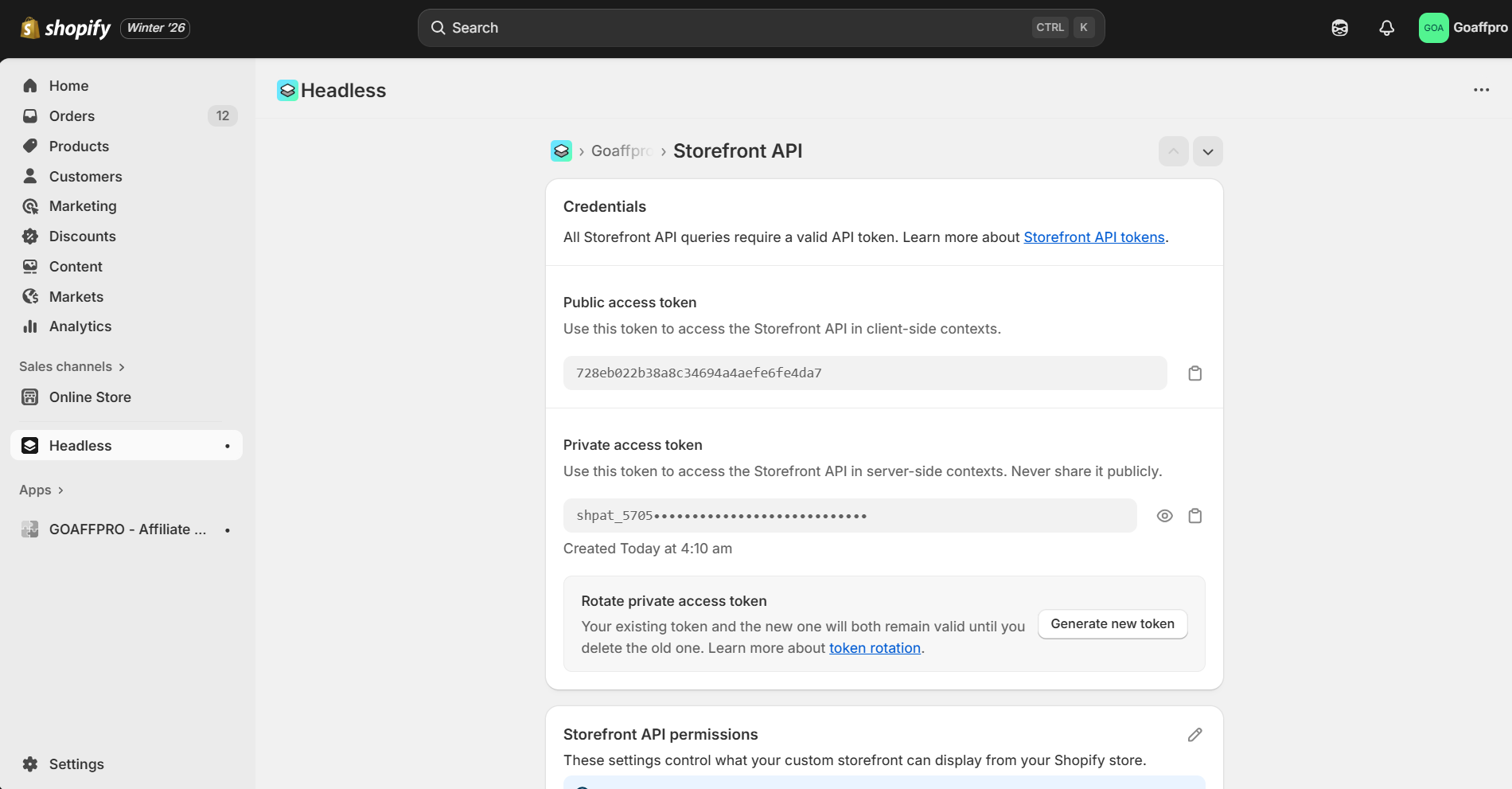
This will open up the Storefront API section.

<figure><img src="/files/hMKMtGafOo4o3oXzCNiT" alt=""><figcaption><p>Storefront API</p></figcaption></figure>

Next, click on **Edit** to update the Storefront API permissions.

<figure><img src="/files/BIDRYv4ICdqkxcvui0Eu" alt=""><figcaption><p>Storefront API permissions > Click on Edit</p></figcaption></figure>

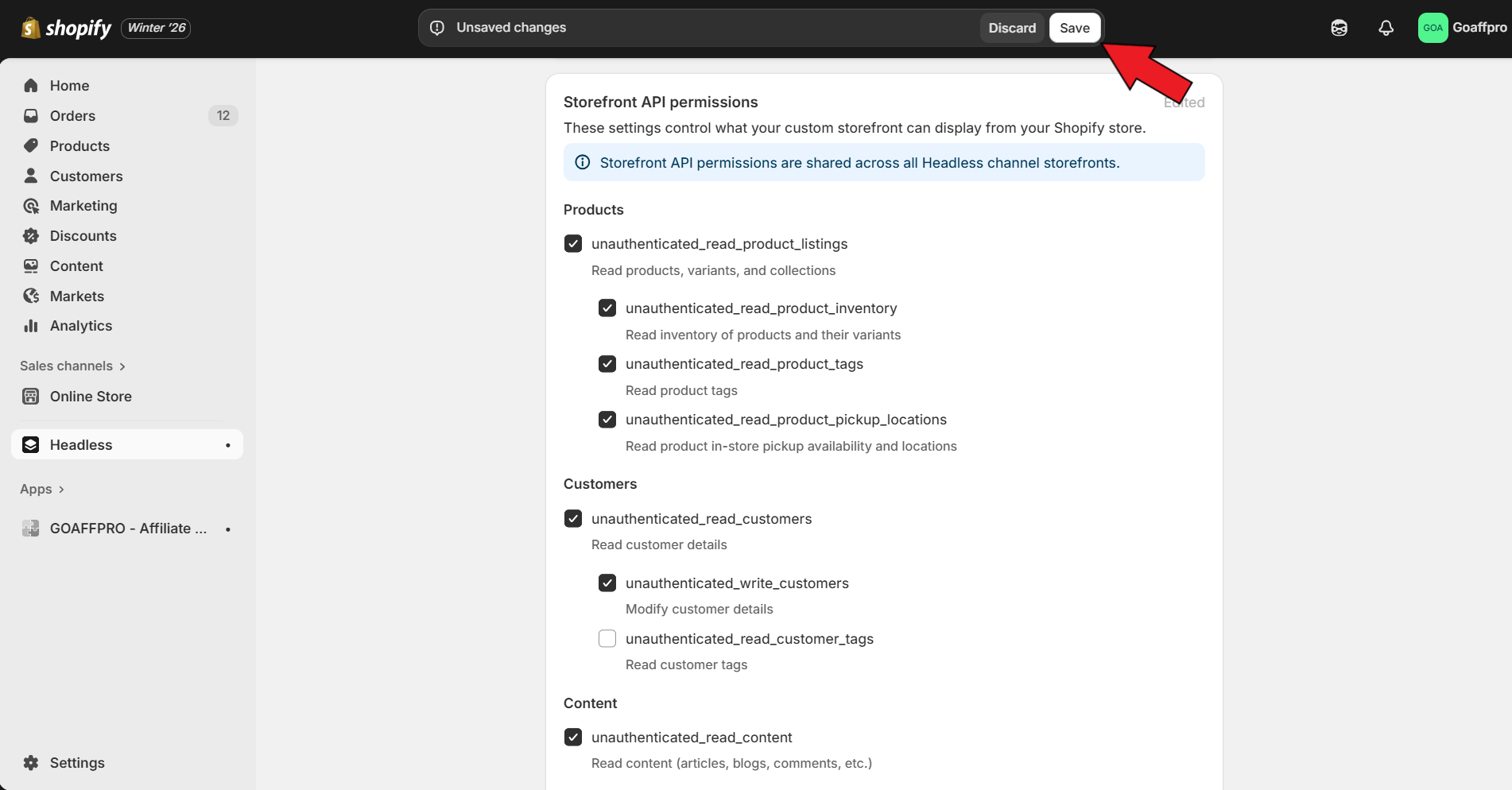
After this, enable the "unauthenticated\_read\_product\_inventory" permission.&#x20;

{% hint style="info" %}
The following Storefront API permissions need to be enabled:&#x20;

* unauthenticated\_read\_product\_listings
* unauthenticated\_read\_product\_inventory
* unauthenticated\_read\_product\_tags
* unauthenticated\_read\_customers
* unauthenticated\_write\_customers
* unauthenticated\_read\_content
* unauthenticated\_read\_checkouts
* unauthenticated\_write\_checkouts

Please note that most of these permissions are enabled by default.
{% endhint %}

<figure><img src="/files/4a1haV4IHsMqP3qqBDEc" alt=""><figcaption><p>Enable the "unauthenticated_read_product_inventory" permission</p></figcaption></figure>

Finally, click on **Save**.

<figure><img src="/files/wD3mXmG2y8bGEQ8KotNp" alt=""><figcaption><p>Click on Save</p></figcaption></figure>

Now, copy the Storefront API access token.

<figure><img src="/files/HHxfXlptvprWkS3DnrJS" alt=""><figcaption><p>Copy the Storefront API access token</p></figcaption></figure>

Paste the Storefront API access token in the Affiliate Store section of the GoAffPro app.

<figure><img src="/files/bzrY0uF0bYC7S8Lnd3Ti" alt=""><figcaption><p>Paste the Storefront API access token</p></figcaption></figure>

Finally, click on **Submit**.

<figure><img src="/files/BcwMIibZrd2GOuxElsMX" alt=""><figcaption><p>Click on Submit</p></figcaption></figure>

The affiliate store is now enabled and will be visible in the affiliate dashboard.

<figure><img src="/files/22Eu53PVSiIOfmSWM4P3" alt=""><figcaption></figcaption></figure>

{% embed url="<https://youtu.be/7vOPVxdIjd0>" %}
Generate Storefront Access Token
{% endembed %}


---

# Agent Instructions: Querying This Documentation

If you need additional information that is not directly available in this page, you can query the documentation dynamically by asking a question.

Perform an HTTP GET request on the current page URL with the `ask` query parameter:

```
GET https://docs.goaffpro.com/program-settings/extra-settings/setup-affiliate-mini-store/setup-affiliate-store.md?ask=<question>
```

The question should be specific, self-contained, and written in natural language.
The response will contain a direct answer to the question and relevant excerpts and sources from the documentation.

Use this mechanism when the answer is not explicitly present in the current page, you need clarification or additional context, or you want to retrieve related documentation sections.