# Zendesk SSO Integration

**GoAffPro** provides you with the option to integrate Zendesk SSO.

To integrate Zendesk SSO, go to the **Integrations** section of the **Settings** tab in the GoAffPro admin panel.

<figure><img src="https://1200686697-files.gitbook.io/~/files/v0/b/gitbook-x-prod.appspot.com/o/spaces%2F-LdPzLtyP46oY7cyXnkw%2Fuploads%2FYz4DtJeIvZhgefFXl9S0%2Fimage.png?alt=media&#x26;token=16bc2f26-0153-4f3e-ba81-f5e20d2b8275" alt=""><figcaption><p>Settings > Integrations</p></figcaption></figure>

Here, go to the Zendesk SSO section.

<figure><img src="https://1200686697-files.gitbook.io/~/files/v0/b/gitbook-x-prod.appspot.com/o/spaces%2F-LdPzLtyP46oY7cyXnkw%2Fuploads%2FpxMHvnAOpVX8Y6UzdNkJ%2Fimage.png?alt=media&#x26;token=4820e280-55e0-415b-9652-1e4fb0a7c850" alt=""><figcaption><p>Zendesk SSO</p></figcaption></figure>

Now, click on **Setup**.

<figure><img src="https://1200686697-files.gitbook.io/~/files/v0/b/gitbook-x-prod.appspot.com/o/spaces%2F-LdPzLtyP46oY7cyXnkw%2Fuploads%2FphwDUityQfDUCHuqzLCf%2FScreenshot%202024-08-12%201822245.png?alt=media&#x26;token=0632db06-b08a-4519-bb14-ae9cc58534da" alt=""><figcaption><p>Click on Setup</p></figcaption></figure>

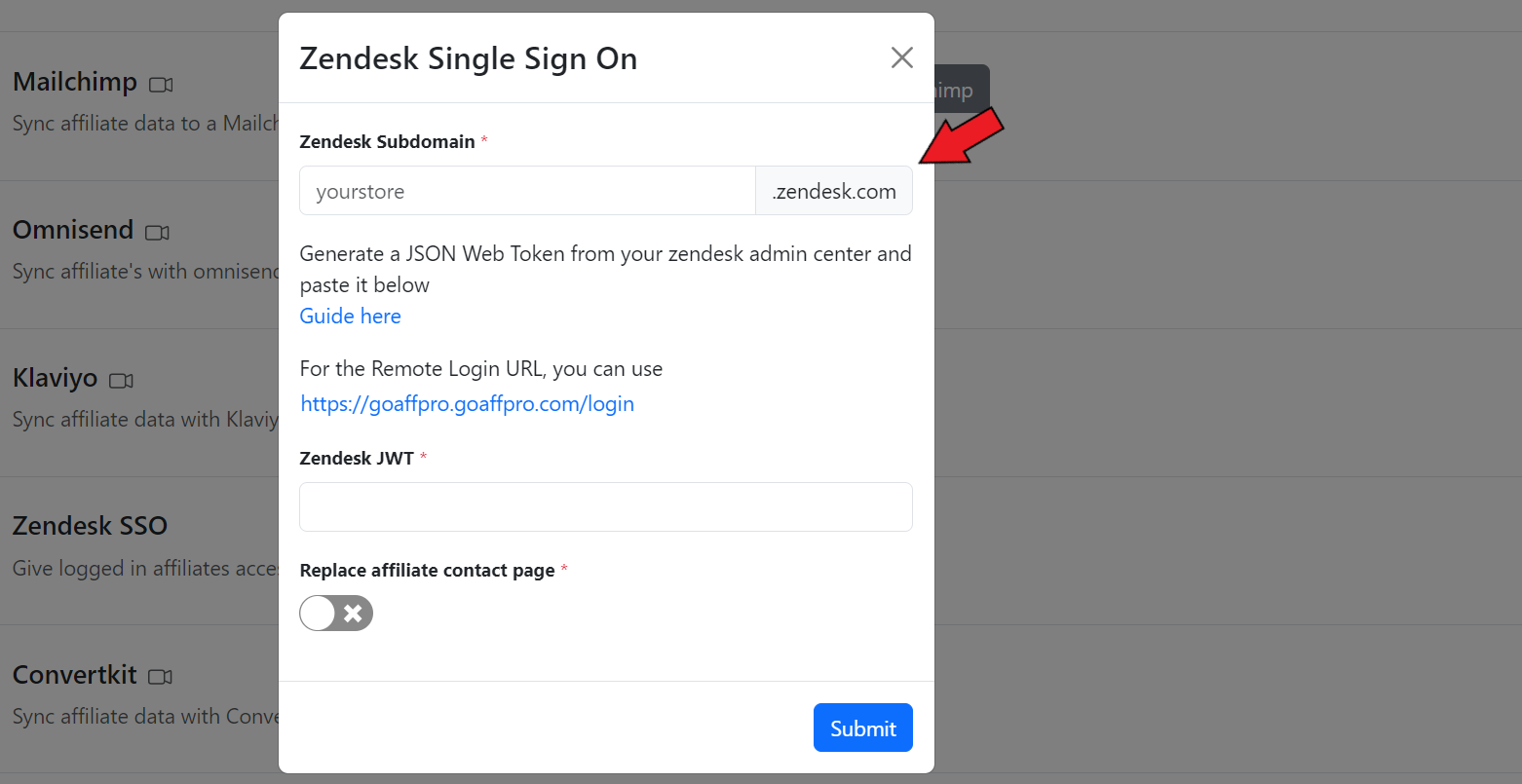
Here, set the Zendesk subdomain.&#x20;

<figure><img src="https://1200686697-files.gitbook.io/~/files/v0/b/gitbook-x-prod.appspot.com/o/spaces%2F-LdPzLtyP46oY7cyXnkw%2Fuploads%2FFkhi4TksqUXi0uESo7Zu%2FScreenshot%202024-08-12%201822444.png?alt=media&#x26;token=fefacbe7-749f-481d-818e-e3d9a0268474" alt=""><figcaption><p>Add the Zendesk subdomain</p></figcaption></figure>

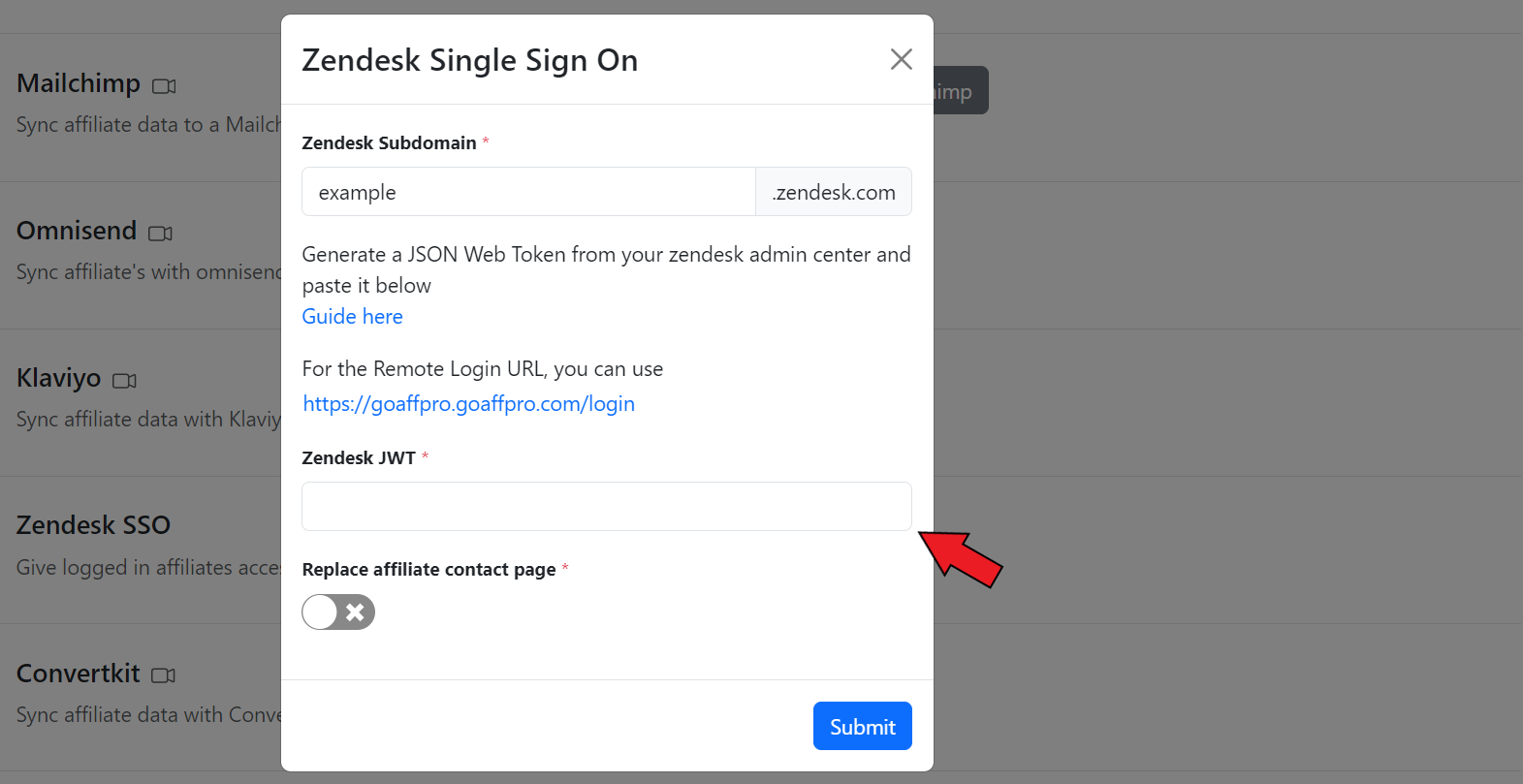
Now, add the Zendesk JWT.&#x20;

{% hint style="info" %}
You can follow this [guide](https://support.zendesk.com/hc/en-us/articles/4408845838874-Enabling-JWT-single-sign-on#topic_gds_ydj_zj) to generate the Zendesk JWT (JSON Web Token).
{% endhint %}

<figure><img src="https://1200686697-files.gitbook.io/~/files/v0/b/gitbook-x-prod.appspot.com/o/spaces%2F-LdPzLtyP46oY7cyXnkw%2Fuploads%2FX2JYizN1ZVcjnUoGmcbR%2FScreenshot%202024-08-12%201823402.png?alt=media&#x26;token=c0bf4da5-2219-473d-8f65-0400503df5bd" alt=""><figcaption><p>Add the Zendesk JWT</p></figcaption></figure>

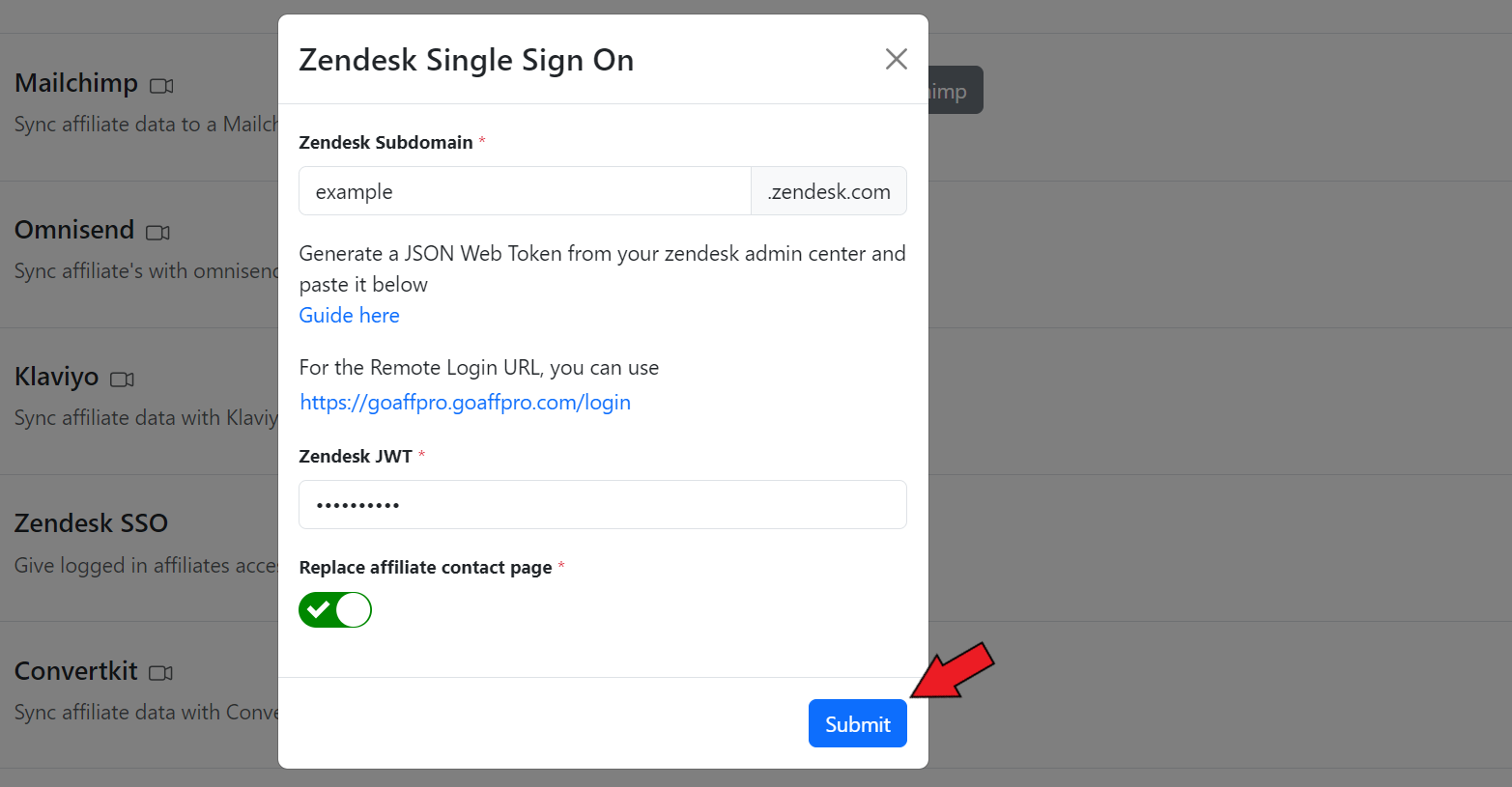
After this, enable the reply affiliate contact page toggle.&#x20;

<figure><img src="https://1200686697-files.gitbook.io/~/files/v0/b/gitbook-x-prod.appspot.com/o/spaces%2F-LdPzLtyP46oY7cyXnkw%2Fuploads%2FYlZUJaA2L5PNOGvxrhF5%2FScreenshot%202024-08-12%201824345.png?alt=media&#x26;token=a1347609-7523-4470-ad74-71370bfcfe2c" alt=""><figcaption><p>Enable the Replace affiliate contact page toggle</p></figcaption></figure>

Finally, click on **Submit**.

<figure><img src="https://1200686697-files.gitbook.io/~/files/v0/b/gitbook-x-prod.appspot.com/o/spaces%2F-LdPzLtyP46oY7cyXnkw%2Fuploads%2Fvfcg0Pr2AvhRTSeZ2hBP%2FScreenshot%202024-08-12%201482356.png?alt=media&#x26;token=1a655290-9e9f-4e27-8b76-301b0d3652d0" alt=""><figcaption><p>Click on Submit</p></figcaption></figure>

Zendesk SSO will get connected to the app.

<figure><img src="https://1200686697-files.gitbook.io/~/files/v0/b/gitbook-x-prod.appspot.com/o/spaces%2F-LdPzLtyP46oY7cyXnkw%2Fuploads%2F7vLgggKqEwuPJ3OWwHrp%2Fimage.png?alt=media&#x26;token=e3b60ba8-3c44-4212-b168-33e0a3bb9811" alt=""><figcaption></figcaption></figure>